Feature #22394
closed

Smarter selection of data/workflows tab
Description
- Have a preferred tab which is always displayed after a navigation action (right now, the one that it shows after navigation is based on React state)
- Specifically, if I'm looking at workflows right now and my preferred tab is Data, then navigation will always switch to show the Data tab
- User option to choose which tab to prefer showing
- From discussion, I think we add a new "User Preferences" panel accessed through the top right "User" menu.
- This would have a toggle button for the desired behavior
- I was thinking it could be saved in local storage, but actually the user record has a "prefs" field which was kind of intended for this sort of thing, so maybe we should use that?
Stretch goal: If it's not too expensive, show counts in tab title as |Data (50)|Workflows (10)|. This should just use the same count as the data table under the tab, we definitely don't want to be doing any additional API queries.
Struck from earlier description: do not reorder tabs or do clever tab switching based on the current tab contents being empty. The purpose of including a count in the tab title is to indicate if there's content in the other tab without having to click on it.
Files
 Updated by Peter Amstutz about 1 year ago
- Target version changed from Development 2025-01-29 to Development 2025-02-12
Updated by Peter Amstutz about 1 year ago
- Target version changed from Development 2025-02-12 to Development 2025-02-26
Updated by Peter Amstutz about 1 year ago
- Description updated (diff)
- Subject changed from Show counts in tab title or hide workflows tab entirely when there are no workflows in a project to Smarter selection of data/workflows tab
Updated by Peter Amstutz about 1 year ago
- Target version changed from Development 2025-02-26 to Development 2025-03-19
Updated by Peter Amstutz about 1 year ago
- Target version changed from Development 2025-03-19 to Development 2025-02-26
Updated by Peter Amstutz about 1 year ago
- Target version changed from Development 2025-02-26 to Development 2025-03-19
Updated by Peter Amstutz about 1 year ago
- Target version changed from Development 2025-03-19 to Development 2025-04-02
Updated by Peter Amstutz about 1 year ago
- Target version changed from Development 2025-04-02 to Development 2025-04-16
 Updated by Brett Smith 12 months ago
Look, my input matters less than any serious Workbench user, but IMO both these bullets are extraneous:
Peter Amstutz wrote:
- I think the preferred tab should appear first in tab order, so if you want to see workflows, the tabs are
|Workflows (10)|Data (50)|
As long as the preferred tab opens first, why does the display order matter? I feel like this makes documentation and information sharing more difficult without any tangible benefit.
- If the preferred tab is empty, switch to the alternate tab, unless they are both empty.
I think this is just too clever by half. I think it will make the interface feel less predictable and more random. If I want to see workflows first, and I open a project with no workflows, I would prefer to be told that explicitly rather than be shown something else. I get that it saves clicks if you understand everything going on, and I get why some people might want that, but I think it'll be surprising and disorienting when you're not expecting it.
Updated by Peter Amstutz 12 months ago
Brett Smith wrote in #note-20:
Look, my input matters less than any serious Workbench user, but IMO both these bullets are extraneous:
Peter Amstutz wrote:
- I think the preferred tab should appear first in tab order, so if you want to see workflows, the tabs are
|Workflows (10)|Data (50)|As long as the preferred tab opens first, why does the display order matter? I feel like this makes documentation and information sharing more difficult without any tangible benefit.
- If the preferred tab is empty, switch to the alternate tab, unless they are both empty.
I think this is just too clever by half. I think it will make the interface feel less predictable and more random. If I want to see workflows first, and I open a project with no workflows, I would prefer to be told that explicitly rather than be shown something else. I get that it saves clicks if you understand everything going on, and I get why some people might want that, but I think it'll be surprising and disorienting when you're not expecting it.
This is useful feedback, I will tweak the description (Stephen, hold off on starting this until I've had a chance to update the description, hopefully later today).
 Updated by Stephen Smith 11 months ago
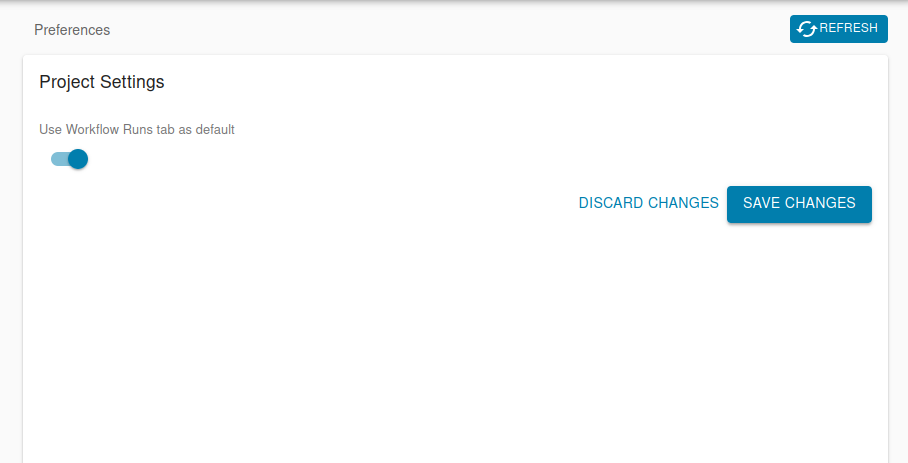
- File Screenshot_20250417_134722.png Screenshot_20250417_134722.png added
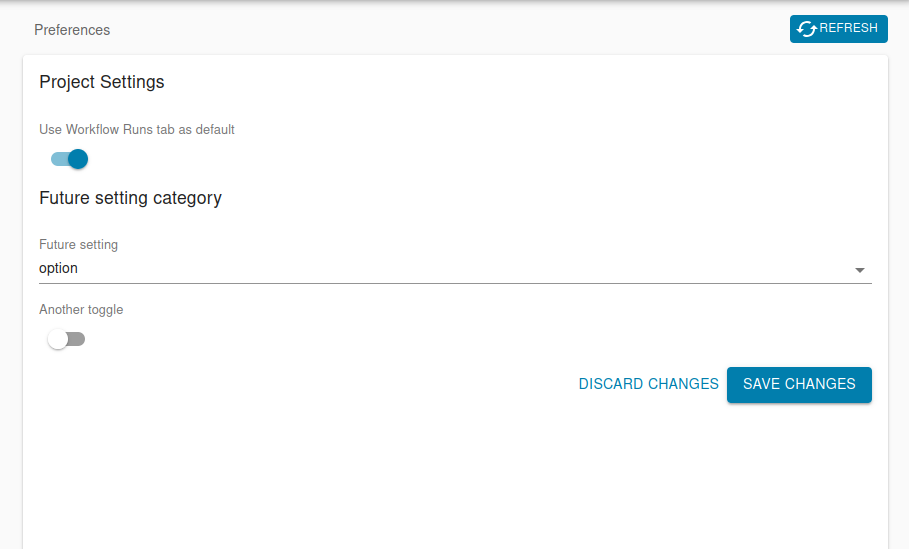
- File Screenshot_20250417_134707.png Screenshot_20250417_134707.png added
Here is the current state of the preferences page with just the project tab toggle:

And a mockup of what it might look like if more settings are added:

Updated by Peter Amstutz 11 months ago
A radio button would be:
Preferred tab

(*) Data tab     ( ) Workflow tab
Updated by Stephen Smith 11 months ago
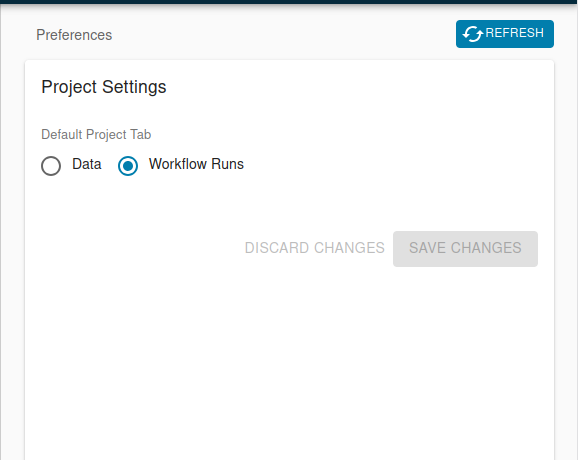
Here's what it looks like now with radio buttons

Updated by Stephen Smith 11 months ago
Changes at arvados|a682f6f5a3331ada35da339210722cb6300a344f branch 22394-project-tab-preference
Tests developer-run-tests-services-workbench2: #1509
- All agreed upon points are implemented / addressed.
- Added user preferences page to account menu
- Added writable to readonly fields (this removes the need to manually select updatable fields on resources like user resource)
- Changed project panel initial tab state to respect user preference
- Changed MPV tabs to reset tab state to initial on route change
- Updates auth store when user profile or preferences is updated (since the auth store keeps an additional copy of the logged in user record it previously got out of sync)
- Anything not implemented (discovered or discussed during work) has a follow-up story.
- none
- Code is tested and passing, both automated and manual, what manual testing was done is described
- Added tests to verify correct default tab selection and resetting tab on route change
- Documentation has been updated.
- n/a
- Behaves appropriately at the intended scale (describe intended scale).
- no change in scale
- Considered backwards and forwards compatibility issues between client and server.
- Users without a preference set will see empty radio selectors at first, there is no current way to unset the preference since they can just switch it back to the Data tab
- Follows our coding standards and GUI style guidelines.
- Yes
 Updated by Lisa Knox 11 months ago
This all lgtm, the only nitpick is that the discard/save changes buttons should probably be at the bottom of the user preferences page. I'm just thinking that as the page gets filled with options over time, the buttons will move with them, and ideally they would always be in the same spot.
Updated by Peter Amstutz 11 months ago
I gave this another try and it looks good to me, I am +0 on pinning the save button to the bottom of the page, it is probably the right thing to do long term (when there enough options that the page needs to scroll vertically), but isn't necessary for this particular branch, so it is up to you whether you'd rather do the work now or later.
Updated by Stephen Smith 11 months ago
I think the main argument for keeping them on separate pages besides avoiding work is that the preferences are workbench UI settings and profile/groups are more directly related to the user account, even if preferences are actually stored on the user account. I think it would make more sense to combine them if Profile could be grouped with "Groups" (or groups exist under profile) since the tabs being Profile/Groups/Preferences feels a little weird.
Updated by Peter Amstutz 11 months ago
Stephen Smith wrote in #note-35:
I think the main argument for keeping them on separate pages besides avoiding work is that the preferences are workbench UI settings and profile/groups are more directly related to the user account, even if preferences are actually stored on the user account. I think it would make more sense to combine them if Profile could be grouped with "Groups" (or groups exist under profile) since the tabs being Profile/Groups/Preferences feels a little weird.
Ok, let's leave it the way it is for now.
Updated by Stephen Smith 11 months ago
Changes at arvados|06989b51b6ea2eab9d3033a952fb20673a414a42
Tests developer-run-tests-services-workbench2: #1511
- Tweaked flexbox styling to pin the save buttons to the bottom and let the preferences form scroll.
Updated by Stephen Smith 11 months ago
- Status changed from In Progress to Resolved