Feature #22820
closed

Ability to create, edit and delete external credentials in workbench
Description
Need a new page to work with the new credentials feature.
Requirements:
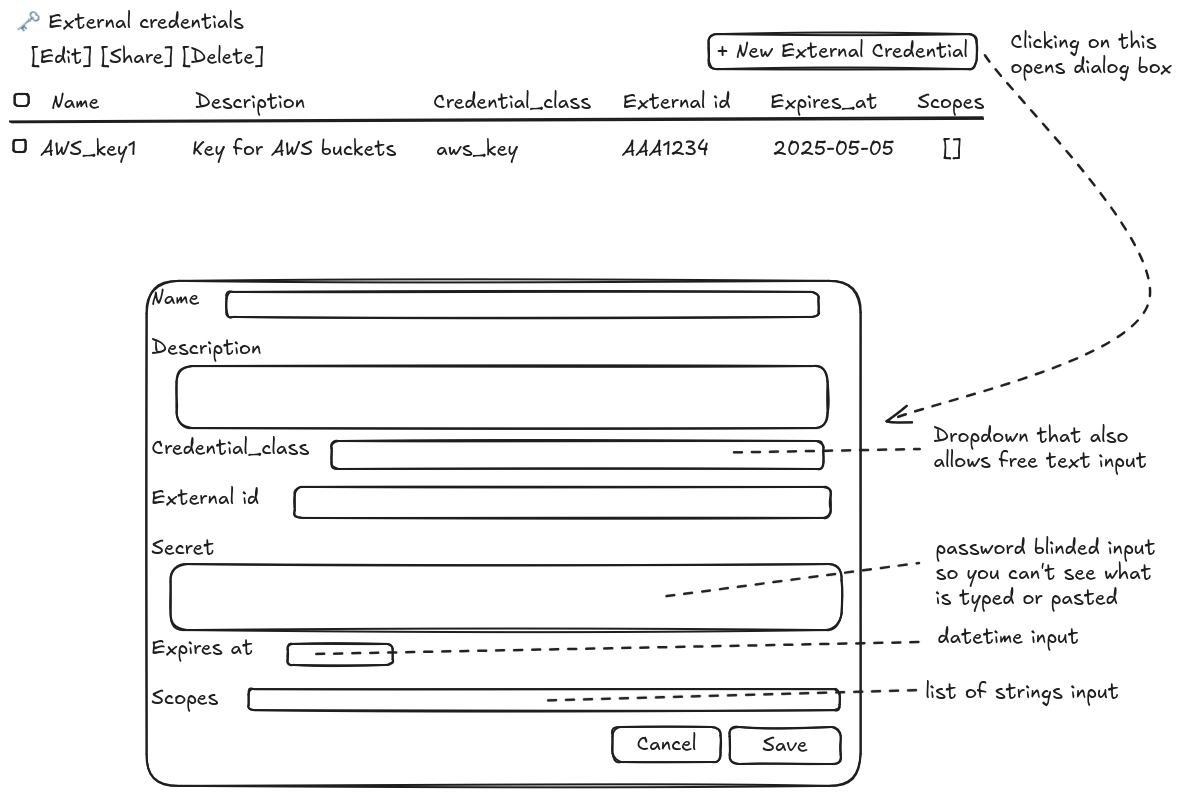
- Display a data table listing the credentials visible to the user. It should support normal paging.
- Have a "New credential" button
- Have an "Edit credential" button that brings up an edit dialog (see below)
- Have a "Share credential" button that brings up the standard sharing dialog
- Have a "Delete credential" button
Pressing "New credential" or "Edit credential" brings up a dialog box.
The dialog box offers the following fields:
- Name -- regular 'name' field
- Description -- rich text editor
- Credential id -- single line text field
- Credential secret -- this should be a blinded password entry field, but it should permit pasting in modest-sized multi-line text blobs such as ssh private keys.
- Credential scopes -- this is a JSON array of strings, consider using an editing control similar to how we add users for sharing where we enter text and then it is converted to a badge when the user hits return (but this is easier, we don't need autocomplete)
- Expiration time -- provide a datetime picker (I think we have one to select the expiration time when creating anonymous sharing links to files).
"secret" is not returned by the API so it is very important, when saving edits, that "secret" is not sent to the server if it was not filled in by the user with a new value (because the empty value will wipe out the actual secret value).
Try to avoid storing secrets in redux; once the edit dialog is closed and the save/update operation has finished, the browser should forget about the secret.
- Implement workbench2/src/services/credentials-service for the new API. It mostly follows standard resource conventions, but review the docs here: https://doc.arvados.org/main/api/methods/credentials.html
- To figure out: Does API server advertise the list of supported
credentials_classvalues? e.g., is it in config? If so, you can get it from there. If not, it's okay to hardcode a list of supported values (just one right now). We do not expect it to change very often so there's minimal concern about Workbench's list getting out of sync with API server's.
- To figure out: Does API server advertise the list of supported

Files
 Updated by Peter Amstutz 11 months ago
- Blocked by Feature #22680: store persistent credentials to external resources and provide them to a container added
Updated by Peter Amstutz 11 months ago
- Description updated (diff)
- File external-credentials-UI.png external-credentials-UI.png added
Updated by Peter Amstutz 11 months ago
- Has duplicate Feature #22851: New editing UI for credentials added
Updated by Peter Amstutz 11 months ago
Notes:
Setting credential_class to a known value modifies the labels for "external id" and "secret" to be more specific to the credential type.
Picking a date time for expires_at should start at the current time using the datetime picker that we use for sharing URLs. The expires_at time field should display the relative time (e.g. "in 15 days") along with a more precise date and time. It should show the relative time/precise value in the expires_at column a well.
 Updated by Brett Smith 9 months ago
- Target version changed from Development 2025-06-25 to Development 2025-07-09
Updated by Brett Smith 9 months ago
- Assigned To deleted (
Stephen Smith) - Status changed from In Progress to New
Updated by Brett Smith 9 months ago
- Release deleted (
79) - Target version deleted (
Development 2025-07-09)
Updated by Brett Smith 7 months ago
- Target version set to Development 2025-09-03
- Assigned To set to Lisa Knox
Updated by Brett Smith 7 months ago
- Target version changed from Development 2025-09-03 to Development 2025-09-17
 Updated by Lisa Knox 7 months ago
- Related to Bug #23152: Validate schema of complex fields added
Updated by Brett Smith 7 months ago
If a credential's scopes are not an array, the only requirement is that Workbench should not crash. You can ignore the value in rendering, overwrite it for updates, etc., all silently. The fact that the API server allows non-array values is an API server bug and you should not spend any extra development effort accommodating it.
Updated by Lisa Knox 6 months ago
- File xcred-expiredbadge.png xcred-expiredbadge.png added
Updated by Brett Smith 6 months ago
- File clipboard-202509121014-kcyog.png clipboard-202509121014-kcyog.png added
- File clipboard-202509121010-tc05i.png clipboard-202509121010-tc05i.png added
Setting credential_class to a known value modifies the labels for "external id" and "secret" to be more specific to the credential type.
What this means is that, e.g., once you set the credential class to aws_access_key, External ID should become AWS Access Key ID and secret should become AWS Secret Key. Lisa pointed out that this mapping would be better done in the API server discovery document/config, and I agree. We will not do this in Workbench for now, especially since there's only kind of credential class we support.
We also discussed, because there's only one credential class right now, the input can just be a plain text field with aws_access_key as the default value for new credentials. Once we support multiple classes we'll probably want an autocomplete-style text-with-pulldown input, but there's no need to implement that now.
Interface notes as of 30712e1575d751c87ff7ca9a135a9c42263ac385. I originally had more notes but I see a lot of them necessarily follow from the API design of credentials. I think you did a great job considering some of the decisions that were already made. I think would be nice improvements but aren't required and aren't worth spending a bunch of time on:
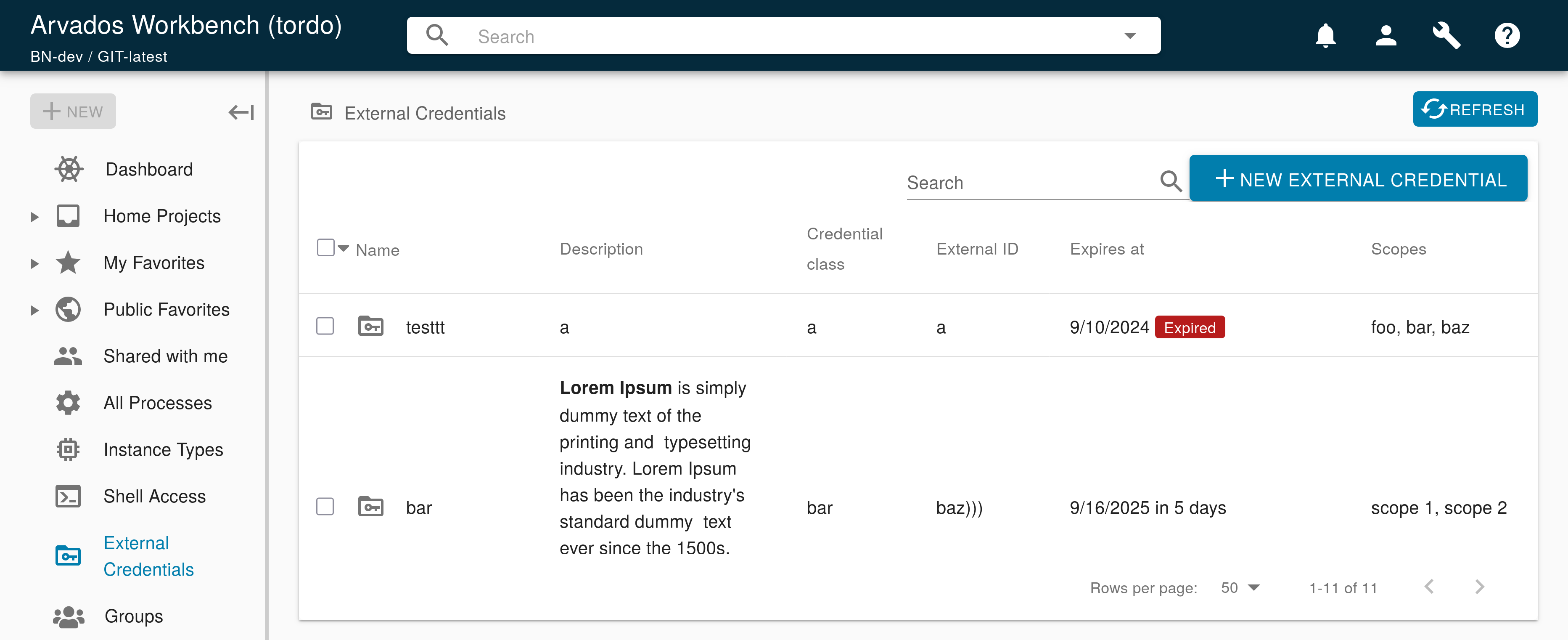
- The "expires at" duration feels a little verbose. Especially right now, it's showing values like "in 11 months, 30 days," that should really just be "12 months." What do you think about this:
- If the credential is expiring within 100 days, display a Failing-style red outline badge with the text "Expires in N days"
- Otherwise, only display the date with no duration text.
- It would be nice to have a little spacing between Search and the New button in the upper right. (I see we also have this issue on the Groups page.) Spacing like we have between Search and Column Select on project listing pages seems like it would be appropriate. Compare these two:


Updated by Lisa Knox 6 months ago
22820-credentials-ui @ b1eb852590e38b91a1d6b9c238e6ff815fa8c00a
developer-run-tests-services-workbench2: #1610
- ✅ All agreed upon points are implemented / addressed.
- New data explorer exists, with the appropriate behavior and menus in place.
- From initial interface feedback:
- The string "aws_access_key" now populates in the credential class field when creating a new credential.
- A badge now appears showing the time remaining for any expiration date <100 days
- 16 pixels now separate the search field from the "NEW EXTERNAL CREDENTIAL" button.
- The render function for the scopes field will now adapt for any value type passed to it (i.e. If it's an array, good. If it's a string, it will be converted to an array. Other types will be ignored.).
- ✅ Anything not implemented (discovered or discussed during work) has a follow-up story.
- ✅ Code is tested and passing, both automated and manual, what manual testing was done is described
- ✅ The tested code incorporates recent main branch changes.
- Main was merged in a week ago.
- ✅ New or changed UX/UX and has gotten feedback from stakeholders.
- n/a Documentation has been updated.
- ✅ Behaves appropriately at the intended scale (describe intended scale).
- ✅ Considered backwards and forwards compatibility issues between client and server.
- ✅ Follows our coding standards and GUI style guidelines.
Submitting both Code and interface review simultaneously because it seems likely (from previous discussion) that interface review will yield no feedback.
Updated by Brett Smith 6 months ago
Lisa Knox wrote in #note-30:
Submitting both Code and interface review simultaneously because it seems likely (from previous discussion) that interface review will yield no feedback.
Yup, this works for me, thank you.
I would like the "New item" button spacing change to be applied to the Groups page and any other pages that follow this same layout. I realize this is one of those awkward things where it's not really related to the issue in this ticket, but it seems so small it's kind of annoying to make its own ticket+branch+review about. How much effort is it to apply this change elsewhere? If it's easy enough, can we please just roll it into this branch? If not, please make a ticket and I'll prioritize accordingly. Thanks.
Updated by Brett Smith 6 months ago
Sorry, one interface note: When editing a credential, the existing secret is not and should not be available, but it should be possible to replace the secret with a new one.
The credential edit dialog should offer a secret input like the new credential dialog, except now it's optional. It should have placeholder text "Retain current secret" (if you think there's better text I'm open to suggestions). The user may enter a new secret in this field.
When Workbench sends the POST API request to update the credential, the body MUST contain the secret field ONLY IF the user entered a new secret value. If the user left the field alone, then the update must not include a secret field so that the record retains its value on the API server.
Updated by Brett Smith 6 months ago
- Target version changed from Development 2025-09-17 to Development 2025-10-01
Updated by Lisa Knox 6 months ago
22820-credentials-ui @ 5772592ca3e52853f0f1ab49b0a54fa52eafbbaa
developer-run-tests-services-workbench2: #1613
I would like the "New item" button spacing change to be applied to the Groups page and any other pages...
The only page I found that this applies to is the groups page, which is fixed now.
The credential edit dialog should offer a secret input...
Done, and added a unit test to ensure that when updating, the secret field is only passed if the user has changed it.
 Updated by Stephen Smith 6 months ago
- I noticed in the date picker, if you click on the month and press delete and the right arrow key, you can clear out the date which will reset to today, but the actual value will be null and it gives a big scary backend error toast - if it's not possible to make the actual value reset along with the displayed value when each part is deleted, it would be good to have a nicer looking error message for that (perhaps checking the value client side before sending the request)
- In
external-credentials.tswe should addkind: ResourceKind.EXTERNAL_CREDENTIALto the type definition in line with other resource types.- This allows simplifying
isExternalCredentialto be more in line with other type guards - just checkingkindinstead of requiring all fields to have a truthy value. It should probably also take aResourceas a param
- This allows simplifying
- In
external-credentials-actions:L62- The create method should probably also do a form
reset()similar to the update credential method, to ensure the secret isn't lingering around in redux form. - Since
STOP_WORKINGis called in the finally blocks, it isn't needed in the try blocks - In
loadExternalCredentials, we usually don't to logged in checks in page load functions since being logged in is checked globally, with the exception of course if we need to use auth data. I think it's better to assume the global login check passed, and if there's an edge case or permission issue, the page load should fail with an error toast anyway
- The create method should probably also do a form
- In both
create and update-external-credentials-dialog.ts, the trim on the fields doesn't actually modify the data, you could do a map/reduce to build a new object instead. - In
string-array-input.tsxI think you can just tell TS that the input.value is a string[] by adding to the StringArrayInputPropsinput: { value: string[] } & WrappedFieldInputProps;, that way any casting should be unnecessary
Required field issues:
I was able to create a credential using this json (missing name, description, credential_class, and external_id):
{"expires_at":"2026-09-26T13:29:07.393Z","secret":"asd"}
Resulting in a resource like:
{
    "kind": "arvados#credential",
    "etag": "30ip83xn9ryzzv98zcak9ho9z",
    "uuid": "tordo-oss07-vno6cbf8h27q6gp",
    "owner_uuid": "tordo-tpzed-000000000000000",
    "created_at": "2025-09-26T13:30:46.912366000Z",
    "modified_by_user_uuid": "jutro-tpzed-vllbpebicy84rd5",
    "modified_at": "2025-09-26T13:30:46.912726000Z",
    "name": null,
    "description": null,
    "credential_class": null,
    "scopes": [],
    "external_id": null,
    "expires_at": "2026-09-26T13:29:07.393000000Z"
}
Currently only the missing description seems to actually crash the UI, but for those 4 fields we should either make sure a ticket is made for the backend to actually require them or line up the type definition and handle empty/missing values.
(A side effect of having some missing fields is also that the wrong icon is shown, but changing isExternalCredential as above should fix that)
I also created #23179 to do some of the tangentially related type adjustments that I noticed should be done
Updated by Stephen Smith 6 months ago
- Related to Feature #23179: Rework renderer types using GroupContentsResource added
Updated by Brett Smith 6 months ago
Stephen Smith wrote in #note-36:
I was able to create a credential using this json (missing name, description, credential_class, and external_id):
The Workbench implementation follows what the API documentation says is required, so, the documentation is buggy too. My preference is:
- We make a ticket for API server to require most of these fields and update the documentation to match.
- But I would prefer we didn't require description, so if we're revisiting this anyway I would prefer if Workbench didn't require it and could handle it being unset.
Updated by Stephen Smith 6 months ago
Sounds good, so on the WB side we just need to make the description type optional and make it not crash.
Updated by Lisa Knox 6 months ago
- Related to Bug #23181: External Credentials API doesn't match the documentation added
Updated by Lisa Knox 6 months ago
22820-credentials-ui @ 2482a59842212f6097031a48a84e95f3ae4f256f
developer-run-tests-services-workbench2: #1616
- I noticed in the date picker, if you click on the month and press delete...
Fixed. The date picker will now error if the date is in any way invalid, causing a red border and the submit button to be disabled.
- In
external-credentials.tswe should addkind: ResourceKind.EXTERNAL_CREDENTIAL...- In
external-credentials-actions:L62
- The create method should probably also do a form
reset()...- Since
STOP_WORKINGis called in the finally blocks, it isn't needed in the try blocks- In
loadExternalCredentials, we usually don't to logged in checks...
Done
- In both
create and update-external-credentials-dialog.ts, the trim on the fields doesn't actually modify the data, you could do a map/reduce to build a new object instead.
Replaced with a for loop
- In
string-array-input.tsxI think you can just tell TS that the input.value is a string[]...
Done, this was a source of frustration, thanks
Required field issues:
The only optional fields are now "description" and "scopes". Workbench renderers for the External Credentials panel have been modified to handle cases where the API returns null for their fields.
Updated by Stephen Smith 6 months ago
- The date picker seems to still allow you to try to create a credential with no date - if you press the delete key after selecting Y/M/D it still clears the date (though it visually resets to the initial value) and gives a big error toast when submitted.
- There's 1 remaining
as string[]instring-array-mui-input.tsx
Updated by Lisa Knox 6 months ago
developer-run-tests-services-workbench2: #1623 /console
- The date picker seems to still allow you to try to create a credential with no date...
Fixed. Now any time the date picker is cleared, the value is set to the default date and the onchange is called so that it will be passed to redux-form.
- There's 1 remaining
as string[]instring-array-mui-input.tsx
Removed
Updated by Stephen Smith 6 months ago
Just 1 thing, it seems like isValidDate requires a date in the future if I'm reading it right - it might be clearer to call it isValidFutureDate or something to make that more clear.
Besides that lgtm!
Updated by Lisa Knox 6 months ago
- Status changed from In Progress to Resolved
Applied in changeset arvados|8441e4fdf5aa51336c89c8c816a79c284fe2ce4b.