Idea #22959
closed

Create a User Dashboard in Workbench
Description
There has been talk for some time about adding a user dashboard to workbench. This is a proposal for both the layout and location of that dashboard.
With the switch from vertical panel view for some resources to tabbed view for all resources, we find ourselves with an empty panel in the Root Project view, which would be perfect space for a user dashboard.
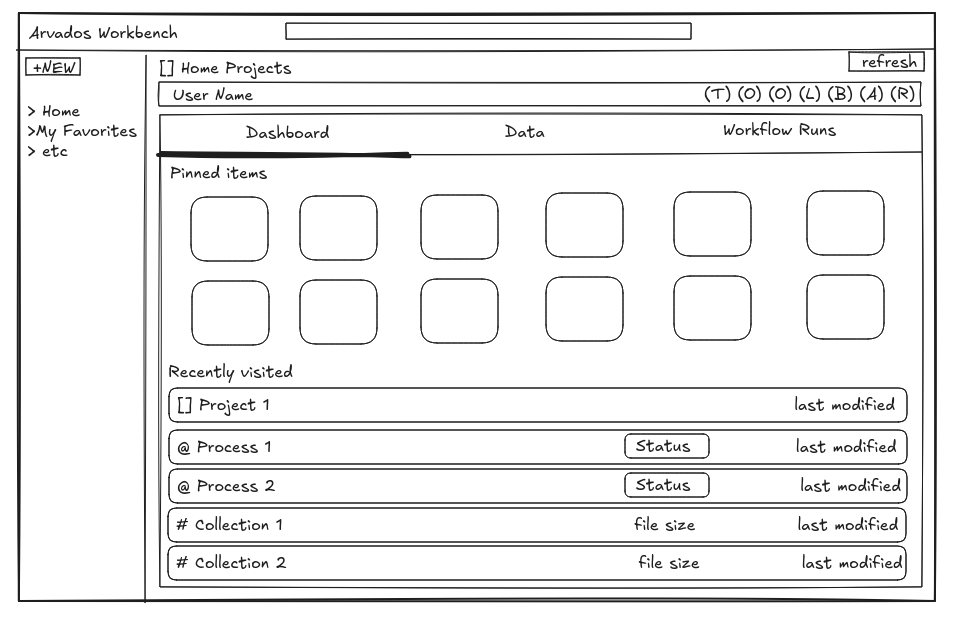
In this mockup, there are two sections in the dashboard: pinned items and recently visited. The data for both of these can be stored as a list of strings in the auth/user item in the db as follows:
- Pinned items:
- A first in - last out stack structure. Originally, I thought this section would just contain the top 10-12 items from "My Favorites", but this would encourage people to limit their favorites to 10-12 items and do a cumbersome shuffling around of favorites when one wants to replace say, the 7th time from the top. Think about what you would need to do to if you wanted to add something to My Favorites without changing your pins. A better solution is just a separate list for pinned items. The pinning mechanism could be in the context menu/toolbar with a warning saying "This pin will replace 'My Project 12345' in the dashboard. Proceed?" One could also remove pinned items from the dashboard.
- Recently visited:
- This is much simpler, a FIFO queue of the last 5-6 Arvados URLs visited
A Data Explorer for either of these is probably impractical and unnecessary. Instead, these items are all clickable links that can be right-clicked for the context menu. The idea is simplicity, readability, and intuitiveness.
Files
 Updated by Brett Smith 9 months ago
- Related to Idea #21292: New workflow picker panel added
Updated by Brett Smith 9 months ago
This could potentially be the basis for the workflow picker in #21292.
Updated by Brett Smith 9 months ago
- Target version set to Development 2025-07-23
- Assigned To set to Lisa Knox
 Updated by Lisa Knox 9 months ago
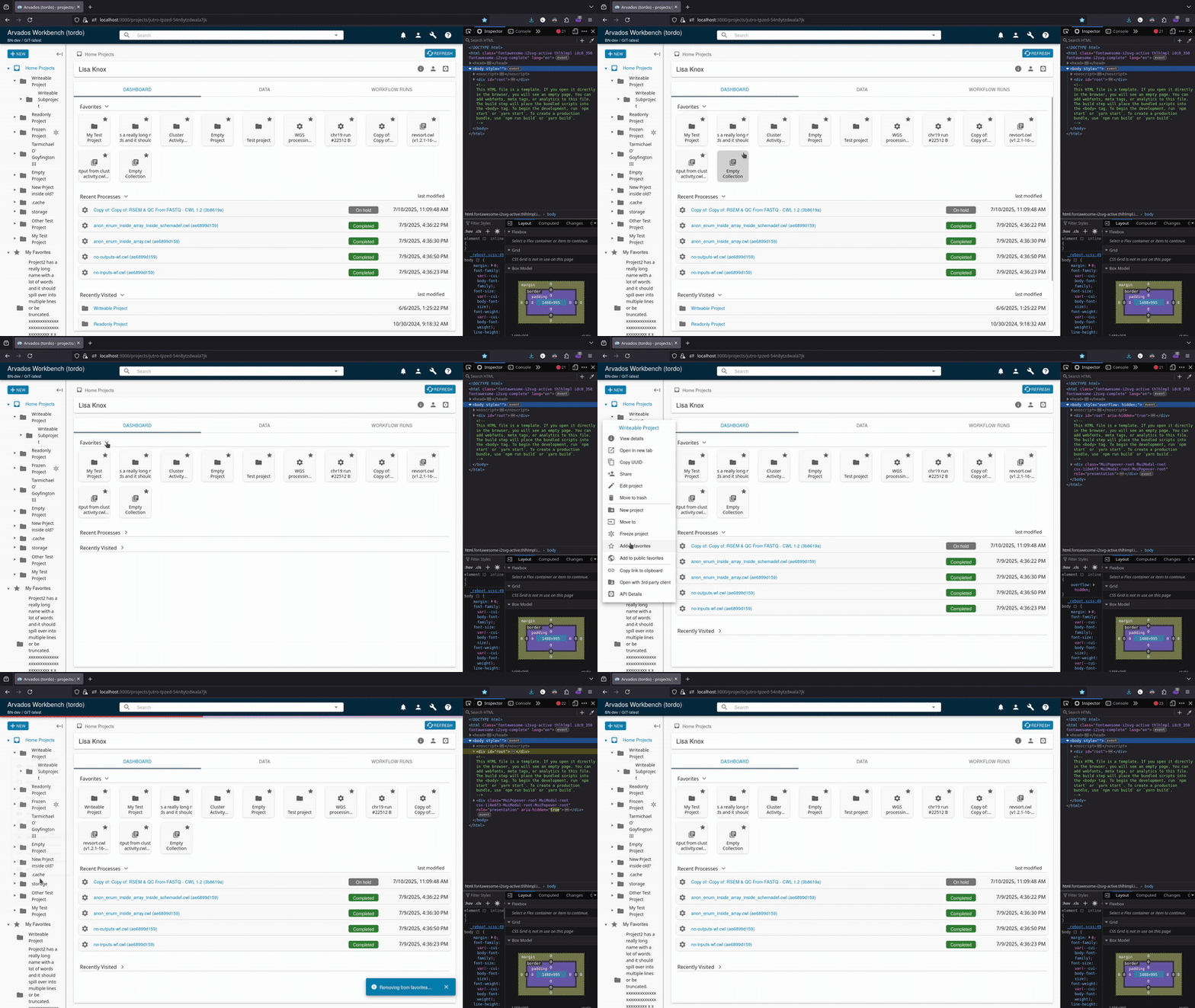
changes at:
22959-mock-dashboard @ 1edc202c89b7be78ecd91f7de358545fb915a64c
The dashboard currently has 3 sections: Favorites, Recent Processes, and Recently Visited. More sections can be added easily. The limit on line items is currently set at 5, but it can be whatever we want. The favorites and recent processes are pulled from data that workbench already has, and the recently visited will be stored as an array of uuids in redux under auth/user/profile, which will save the recents across clusters and logins. The plan is that clicking the names of any of the resources in the dashboard will nav to that resource, and a right-click on any of them will open a context menu.
Updated by Brett Smith 9 months ago
This is really great. I saw it and I wanted to use it immediately. Fantastic first impression.
Here is what I am thinking about: a lot of our users work by uploading big batches of samples, and then running the same workflow on all of them. I am thinking about how to make the dashboard as useful as we can to those users. This means really maximizing the data we show them, both in terms of number of items (we want to show them as much of their recent sample run as possible) and how much data we show about that item (collections and workflows might have long names that are only distinguished by an arbitrary sample number in there somewhere). At the same time, we do still want to keep the emphasis on recency and most active items. I think you're focusing on exactly the right thing there and I don't want to lose track of it.
All these are points for discussion, none of this is a hard requirement.
- I am wondering whether this shouldn't be a Home Project tab, but instead we add a Dashboard entry to the top of left-hand navigation that opens this view. How hard would that be to implement? I think the dashboard deserves to be that discoverable, plus it keeps the home project looking more consistent with others.
- If that's easy enough: how hard would it be to turn the sections of this dashboard into separate tabs? That would make it easier to show more data in each tab without hurting navigability, and be more consistent with the other recent Workbench UI changes.
- If both of those are doable, how would it feel to use the standard list view for each tab? I know it's less attractive than the presentation you have here, and I do think that matters! But I'm also balancing that against the use cases I mentioned at the top: our list view can fit a lot of data that helps users find what they're looking for.
- How hard would it be to make Recent Processes into Recent Workflows, and show only supervisor/top-level processes? If it shows all processes, subprocesses of a single workflow could swamp the entire listing, which would make it a lot less useful.
- We should also have an easy way to show Recent Failed Workflows, since users often prioritize investigating and diagnosing those. But let that be a separate follow-up ticket.
I know I could've given this feedback earlier, and I'm sorry I didn't. A lot of this could've been raised in response to the sketch. Seeing the "Recent Processes" header is what really got me thinking about the scale challenges there, and then led me down this whole train of thought.
Thanks.
Updated by Brett Smith 9 months ago
Right after I wrote my feedback I took a shower and had a bunch of shower thoughts about Workbench. This is strictly thinking out loud, it doesn't need to change any plans.
In principle we already have pages that should be "Recent Favorites" and "Recent Processes:" that should be the default view of My Favorites and All Processes, respectively. The latter isn't that because you can't filter by owner at all. Maybe we should at least offer a "My Processes" filter, and it should probably be enabled by default. (Maybe the page should be renamed from "All Processes" to just "Processes" as part of that.)
I think the primary value a Dashboard can offer is the way it can synthesize a view of your work by recency. Lisa's original draft gets at that by putting everything on one page, but I feel like it could go farther. My tabbed view suggestion is well-meaning but really underlines how little difference there is between these lists and the existing pages.
At its conceptually simplest, a dashboard view could be "a heterogeneous list of projects and processes you have recently viewed/modified, sorted by recency." I think that might be a little too chaotic to be useful but it's a clarifying thought experiment.
Somewhere in between that idea and Lisa's is: the dashboard is split into half. The two halves are Recent Projects and Recent Workflows. "Recent Projects" shows project sorted by the most recent of modification time, view time, favorite time, and "shared with you" time. Recent Workflows is just your recently completed workflows sorted by modification time.
And it doesn't even have to be a literal split. We don't even need headers. We can show projects with widgets like in Lisa's draft, and then workflows in the given view.
The Dashboard needs to fill the screen with things that are most likely useful. I think if anything on the Dashboard is collapsible or resizable, that feels like a bad sign. It means we are not confident we are showing you the right thing. If we're not confident, why put it on the dashboard? Why have a dashboard at all? I don't think that's the end of the conversation: I think Arvados has different kinds of users that will prioritize different things and therefore want different things out of the dashboard. But I think for version 1 we should put our strongest, most confident foot forward, hear feedback from real users, and then consider the right way to incorporate that. I don't think we should start with design hedges (unless it just makes the implementation way easier).
Updated by Lisa Knox 8 months ago
- I am wondering whether this shouldn't be a Home Project tab, but instead we add a Dashboard entry to the top of left-hand navigation that opens this view. How hard would that be to implement? I think the dashboard deserves to be that discoverable, plus it keeps the home project looking more consistent with others.
Part of the motivation for this ticket is that the Home Projects panel is already inconsistent as it has no Overview tab, so Home Projects is 2 tabs and every other project panel has 3. To answer your question though, it would be trivial to add another item to the side panel navigation. We would then have to decide which of these two pages would default start page when logging into wb.
- If that's easy enough: how hard would it be to turn the sections of this dashboard into separate tabs?
- If both of those are doable, how would it feel to use the standard list view for each tab?
These items are both doable, but it's starting to get away from the original idea of the dashboard: a lightweight, broad overview that serves mostly as a way to quickly navigate to items that are likely to be the things you want to quickly navigate to. Data tables are far from lightweight, which is why clickable line items were implemented instead. Tabbed layout and data tables would be more useful to the user, but come at the expense of complexity, performance, and development time.
I think if anything on the Dashboard is collapsible or resizable...
The original idea here was that the states of each dashboard item could be saved, so that each user could have their own dashboard customized to their individual preference. A user might not care about recent processes, for example, they just want to see the most recent projects. This user would have the recent processes section collapsed always and the recent projects section at the top of the page.
- How hard would it be to make Recent Processes into Recent Workflows, and show only supervisor/top-level processes? If it shows all processes, subprocesses of a single workflow could swamp the entire listing, which would make it a lot less useful.
- We should also have an easy way to show Recent Failed Workflows, since users often prioritize investigating and diagnosing those. But let that be a separate follow-up ticket.
Making these tables would be fairly simple, but I think we are headed in a direction that will eventually bring us to this: customizable data table tabs/widgets/panels. A user would be able to generate a data table with certain parameters, including types of data, resources with certain properties (e.g. container_request_uuid = 'xxxx' or workflow = x.cwl), sorted and filtered by user preference. This data table would show up in their dashboard with all of the other custom tables. For example:
- I want a table of the output collections of all runs of workflow X that completed without error
- I want another table of all of the failed runs of that workflow, sorted by exit code
- I want a table of all registered workflows that I created with "foo" in the title or in the description
- etc
The number of tables will have to have some limit because having an endless number of them would kill performance. If we wanted to use tabs, we could have a set number of custom tables that could be generated by default and when one wants to generate a new table, they simply adjust the parameters of a current table. This could be better, actually, because say I may want a table of all runs of workflow X, and then the next week I want the exact same table with a different value for X. I simply open the table parameter UI and paste a different UUID in the appropriate field.
This is a bit beyond the original scope of the ticket, and would probably not be ready for the next release, but I think it is the best way to arrive at what we and our customers actually want.
- The advanced search query that already exists in wb could be a good starting point for the custom widgets
Updated by Lisa Knox 8 months ago
- File drivefolders.png drivefolders.png added
From discussion, it was decided that version one of the dashboard will work as follows:
- The dashboard will be its own separate panel and not part of the Home Projects panel
- There will be a new nav item in the sidepanel for "Dashboard"
- Breadcrumbs will be a single item that says "Dashboard"
- The dashboard will be the default landing page when a user logs in
- There should be 3 sections to start with, in the following order:
- Favorites
- should be rectangular in the style of Google Drive suggested folders:

- The second line ("In My Drive") should be replaced with the file path of the item
- The three-dot menu should be replaced by the favorite star
- The item should open a context menu on right-click
- should take up a set amount of vertical space
- should be rectangular in the style of Google Drive suggested folders:
- Recently Visited
- a data table with only "type" and "last visited" columns
- maximum 12 rows
- sorted by last visited
- items should be stored in redux under auth/user/profile, in the form { "uuid-xxx-xxxx": Date }
- Recent Workflow Runs
- a data table with only "status" and "last modified" columns
- maximum 12 rows
- sorted by start time
- Favorites
Updated by Brett Smith 8 months ago
- Target version changed from Development 2025-07-23 to Development 2025-08-06
Updated by Brett Smith 8 months ago
- Target version changed from Development 2025-08-06 to Development 2025-08-21
Updated by Lisa Knox 7 months ago
developer-run-tests-services-workbench2: #1574
22959-dashboard-rb @ ac6d0ba42753ebc96f6649ac88c1fed9fe4d2337
- ✅ All agreed upon points are implemented / addressed.
- In Favorites Pins, I chose not to put the path of the item on the second line because restricting the name to one line is means that long names get cut off. Users have requested in other areas that longer names be as visible as possible, so I think it's the better of the two options here.
- In Recently Visited, I chose not to include a "type" column both for aesthetics and because the name plate already displays a type icon right beside it. Since the columns are not sortable, the type column would serve no purpose and display redundant information.
- In Recent Workflows, I did not include a header at the top of the status column. This choice is better aesthetically and there is little chance that a user will see a status badge and not understand that what it means.
- ✅ Anything not implemented (discovered or discussed during work) has a follow-up story.
- ✅ Code is tested and passing, both automated and manual, what manual testing was done is described
- ✅ The tested code incorporates recent main branch changes.
- - New or changed UX/UX and has gotten feedback from stakeholders.
- Another interface review is likely warranted
- n/a Documentation has been updated.
- ✅ Behaves appropriately at the intended scale (describe intended scale).
- ✅ Considered backwards and forwards compatibility issues between client and server.
- There are 3 new api calls when the dashboard is displayed, but in practice it is noticeably faster to load than when navigating to the user's Home Projects
- ✅ Follows our coding standards and GUI style guidelines.
Updated by Brett Smith 7 months ago
22959-dashboard-rb @ ac6d0ba42753ebc96f6649ac88c1fed9fe4d2337
This is super solid, thank you. I have some minor comments around the edges but I don't need to take another pass on interface review, these can get a final check in the normal course of branch review.
- When hovering over a recent item row outside the text, the cursor should change to indicate it is clickable. (It is in fact clickable, which is good, that should stay, just the cursor should change to communicate that.)
- When hovering over a recent item, the background becomes a darker gray that does not match the rest of our UI. It should use the same lighter gray as the favorites items and data table rows on other pages.
- This is a bit of a stretch goal, if it's easy it'd be cool to add, if not don't worry about it, it's not required. If the viewport is wide but not quite wide enough to accommodate another favorite, they wrap in a way that's functionally fine but just doesn't look polished, it leaves a lot of dead space on the right:
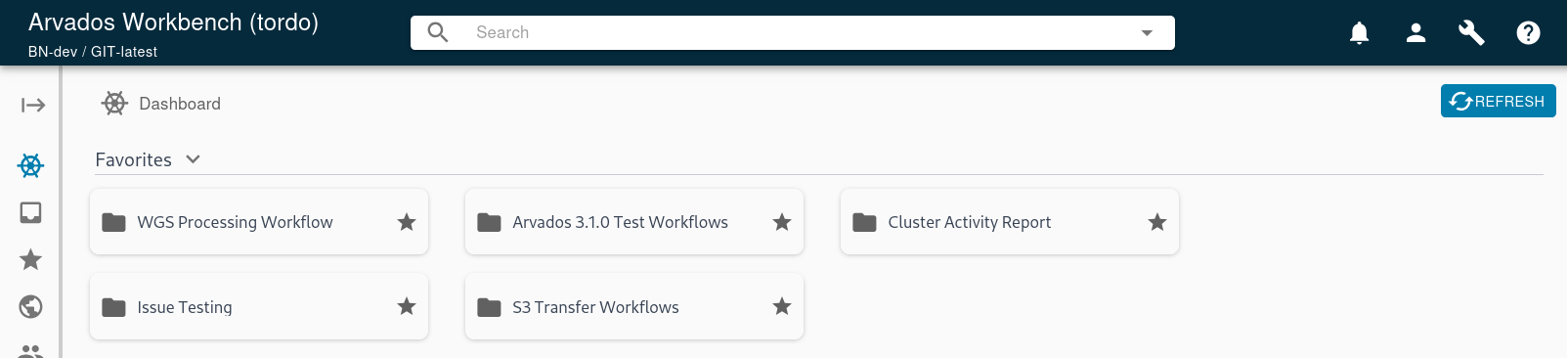 I think the current size is good, I don't think favorites should get smaller than this. It would be cool if they were willing to stretch to be longer horizontally so that all the favorites in a row filled the entire horizontal space of the viewport.
- In Favorites Pins, I chose not to put the path of the item on the second line because restricting the name to one line is means that long names get cut off. Users have requested in other areas that longer names be as visible as possible, so I think it's the better of the two options here.
- In Recently Visited, I chose not to include a "type" column both for aesthetics and because the name plate already displays a type icon right beside it. Since the columns are not sortable, the type column would serve no purpose and display redundant information.
- In Recent Workflows, I did not include a header at the top of the status column. This choice is better aesthetically and there is little chance that a user will see a status badge and not understand that what it means.
Just to confirm, I'm fine with all this. Thanks.
Updated by Lisa Knox 7 months ago
22959-dashboard-rb @ f05b508a56c418fe4056aeacb33b12dfc706aec9
- When hovering over a recent item row outside the text, the cursor should change to indicate it is clickable. (It is in fact clickable, which is good, that should stay, just the cursor should change to communicate that.)
- When hovering over a recent item, the background becomes a darker gray that does not match the rest of our UI. It should use the same lighter gray as the favorites items and data table rows on other pages.
- This is a bit of a stretch goal, if it's easy it'd be cool to add, if not don't worry about it, it's not required. If the viewport is wide but not quite wide enough to accommodate another favorite, they wrap in a way that's functionally fine but just doesn't look polished, it leaves a lot of dead space on the right:
All addressed
 Updated by Stephen Smith 7 months ago
From visual checks:
- The Dashboard breadcrumb doesn't do anything when clicked, it normally triggers a navigation call which has special handlers for "slug" uuids (like
/groupsand other non-uuid pages) which re-triggers theloadWhateverPageinitial load functions which essentially triggers a refresh - The refresh button doesn't seem to do anything, you can probably take hints from other non-dataexplorer pages like preferences or my account for how that's hooked up
- There isn't a Paper wrapper around the dashboard contents to give it a white background, it'll add a bit of margin but every other page uses one so it'll be nice to keep consistency
- There's a weird bug where if your session expires while on the dashboard or if you load /dashboard while logged out, the login redirect sends you back to the login page after logging in, making the only way to get logged in to remove the /dashboard from the url
- It seems the whole section header is clickable but the mouse doesn't change to hint that it is
- I noticed that a loading indicator clear was added to workbench actions on line 206 - I'm curious why it would be needed now but not before - not sure if it could be related to the login bug but thought I'd ask
- I noticed we're piggybacking off of the favorites panel to fetch the favorites but using dedicated data explorers for the recent process/visited, I'm wondering if it would be less error prone to use a separate DE to fetch the favorites, so that it won't be affected by default/current filters of the favorites panel? Not sure if that's a risk
- In
recently-visited.tsxat the bottom there's a date formatter, we can probably use the one informatters.ts - In
favorites.cy.jsI noticed searching for the test collection to cut through all the other stuff left in trash, I've done similar and it might be more robust to use the testFavoriteCollection.name variable in the search so that it doesn't risk breaking in the future if more test collections named collection end up in the trash during tests (line ~392ish)
Updated by Brett Smith 7 months ago
- Target version changed from Development 2025-08-21 to Development 2025-09-03
Updated by Lisa Knox 7 months ago
22959-dashboard-rb @ 0f7316d752bf6c2b45db08c896b17c19b4140c03
developer-run-tests-services-workbench2: #1590
- The Dashboard breadcrumb doesn't do anything when clicked...
- The refresh button doesn't seem to do anything...
Fixed
- There isn't a Paper wrapper around the dashboard contents to give it a white background...
Decision was made in discussion to keep the #fafafa background and make the foreground white
- There's a weird bug where if your session expires while on the dashboard...
- It seems the whole section header is clickable but the mouse doesn't change...
Fixed
- I noticed that a loading indicator clear was added to workbench actions on line 206...
When loading the root project (the former starting page), there is a loading indicator clear at the end of that loading cycle. In the first iteration, the dashboard loading was handled outside of normal loading processes, so a separate indicator clear was necessary. The current iteration now uses the same loading pattern for the dashboard as the rest of workbench, but I still think having the indicator clear attached to the loadWorkbench function makes more sense than having it attached to the dashboard loading. I don't feel super strongly about it either way, though.
- I noticed we're piggybacking off of the favorites panel to fetch the favorites...
Fixed, FavoritePins now uses its own DE and middleware. It still sets the fetched favorite uuids to the regular favorite panel, because I can't see a good reason to duplicate that data.
- In
recently-visited.tsxat the bottom there's a date formatter, we can probably use the one informatters.ts
Done
- In
favorites.cy.jsI noticed searching for the test collection...
Done
Updated by Stephen Smith 7 months ago
- I checked some of the login redirect behavior and noticed that there's the same issue with the redirect in other pages, for example
/processes/tordo-xvhdp-gmk8rqxe0r3hexfalso results in being redirected to the login page again after logging in - this doesn't seem to happen on tordo for some reason
FavoritePins now uses its own DE and middleware. It still sets the fetched favorite uuids to the regular favorite panel
- This is better, and fixes a bug I didn't notice before - setting filters on the my favorites page affected the dashboard favorites. But it seems that there are still some side effects: when the my favorites page is filtered (example type to only collections), navigating to the dashboard briefly shows the filtered results of the favorites page before it gets replaced with the unfiltered pins list. It looks like the filters aren't crossed so I assume this is just due to sharing DE reducer with the favorites page - since the resources live in the resource store and the DE reducer holds just a UUID list, I think it would be worth it to have a separate reducer for the pins so that they're completely separate.
- Only other thing I noticed is that
formatDateseems to assume an ISO date, which I guess must be what the API returns since we shove all those fields directly into formatDate, and.toISOString()is used in one place to feed a date object in to be formatted, so I think it would be slightly more correct to also use.toISOString()instead of.toLocaleString()for consistency.
Updated by Lisa Knox 7 months ago
22959-dashboard-rb @ 0b3e237a41b18782d3bfb860f2b34b28d29e143c
developer-run-tests-services-workbench2: #1599
- I checked some of the login redirect behavior and noticed...
In fixing this, I noticed that I had neglected to address the several different ways to log in. It's all fixed now, and extensive updates to the tests around log in behavior as well.
- This is better, and fixes a bug I didn't notice before...
That's the good reason I was looking for. favoritePins now uses the items field on the favoritePins DE
- Only other thing I noticed is that
formatDateseems to assume an ISO date
Fixed.
I also did another merge with main to keep current.
Updated by Stephen Smith 7 months ago
Just 1 minor thing, otherwise lgtm
- targetRecent.lastVisited seems to already be a date object, so unless I'm mistaken I think you only needed to swap toLocaleString for toISOString, the additional Date() wrapper seems redundant - but if there's a reason to do that for safety then it's fine
Good to merge once that's considered
Edit: I see now that lastVisited is a string, but the type is a Date, as long as it's always expected to be a string then we can just change the RecentUuid type to indicate a string and use Date(). Another option is to change the type to string to match the data and pass it directly to formatDate - assuming this string is already iso formatted because in many other places we pass dates from the API directly to formatDate so if this is similar then no conversion / reformatting might be necessary.
Updated by Lisa Knox 7 months ago
The issue here is that the date stored in redux was not actually a Date object, but a string. The compiler was using the lastVisited: Date field for the type, which led to a mismatch, causing a runtime error when trying to call targetRecent.lastVisited.toISOString(). Fixed by correcting the type declaration to be string instead of Date.
Updated by Stephen Smith 7 months ago
Sounds good! If it's just a date from the API then we can do the same as elsewhere and just pass it directly to formatDate without converting it to a date and back to an iso string
Updated by Lisa Knox 7 months ago
- Status changed from In Progress to Resolved
Applied in changeset arvados|2a4673ce06a0ad05ad0d4ab49db6600818f42319.