
Feature #23026
closed

UI to connect to a container's services from its page
Description
initial_url key, so
- if
published_ports[portnum].access = "public", link topublished_ports[portnum].initial_url - if
published_ports[portnum].access = "private", link topublished_ports[portnum].initial_urlwith the current user's token inserted asarvados_api_token=v2/zzzzz-...&at the front of the query (typicallyinitial_urlwill not have an existing query but we should preserve it when it does)
(Note the initial_url key appears only in the container record, not the container request record.)
When viewing a running process:
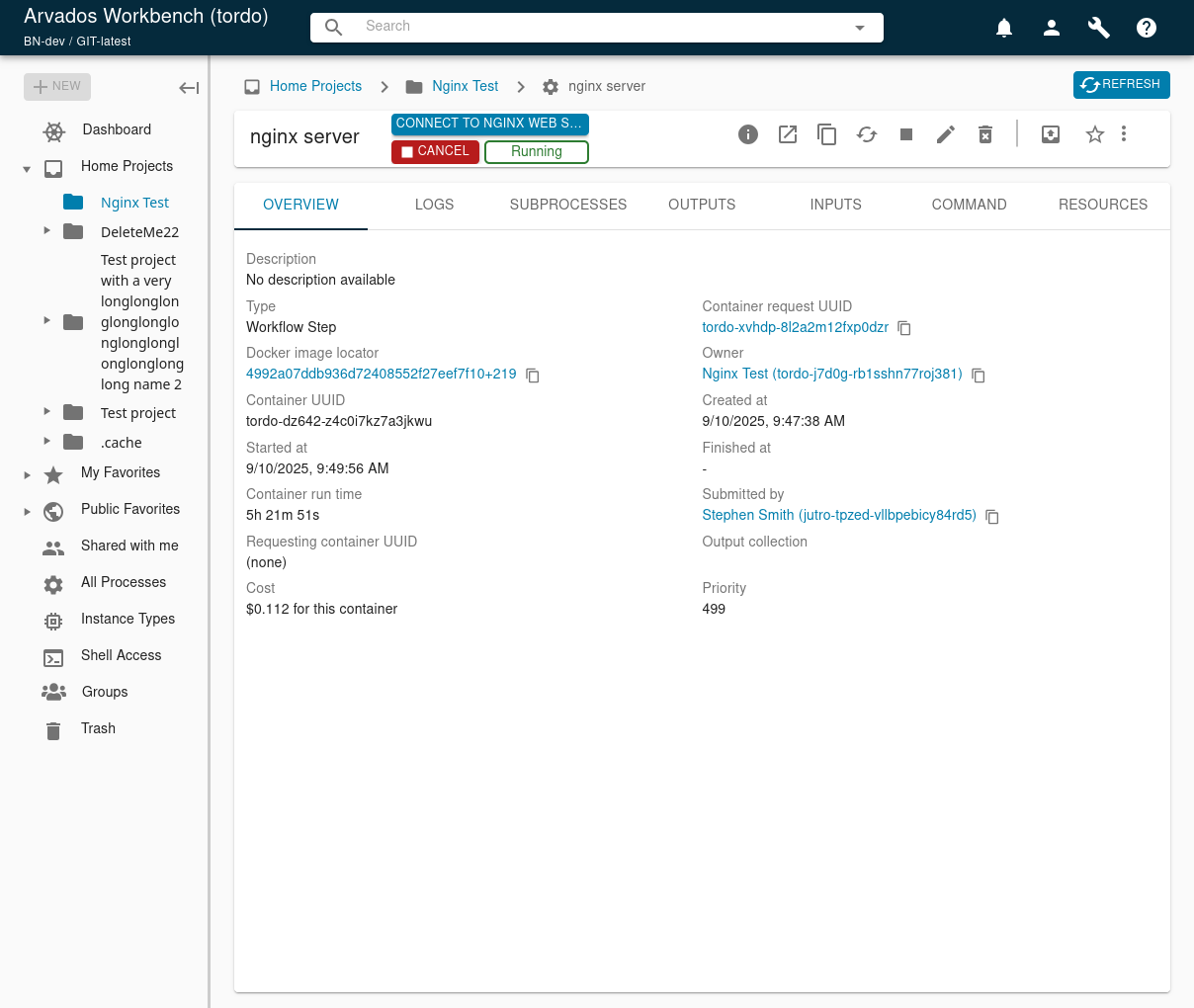
- If it has exactly one published port, provide a button "Connect to [label]" that opens the service URL in a new tab.
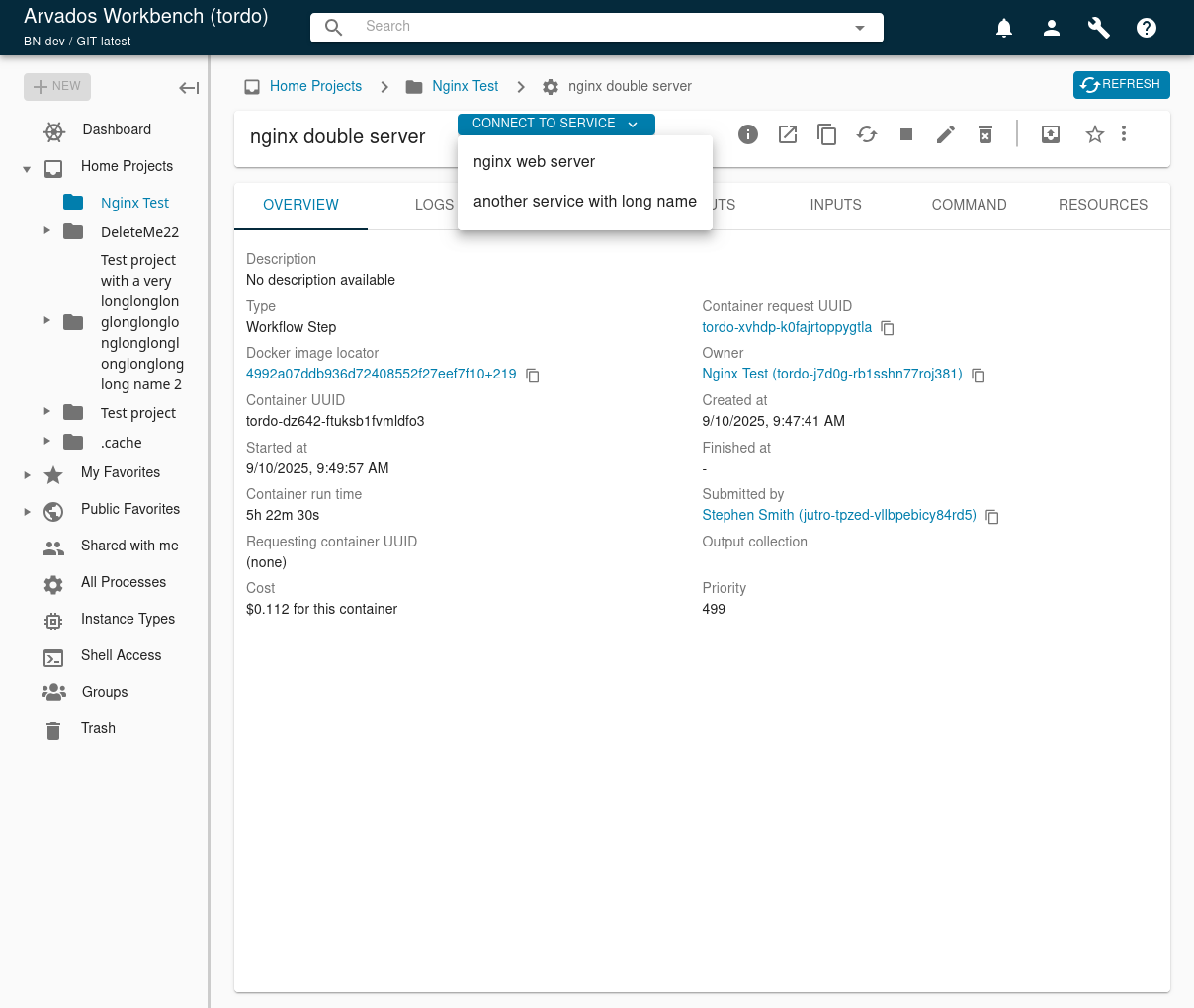
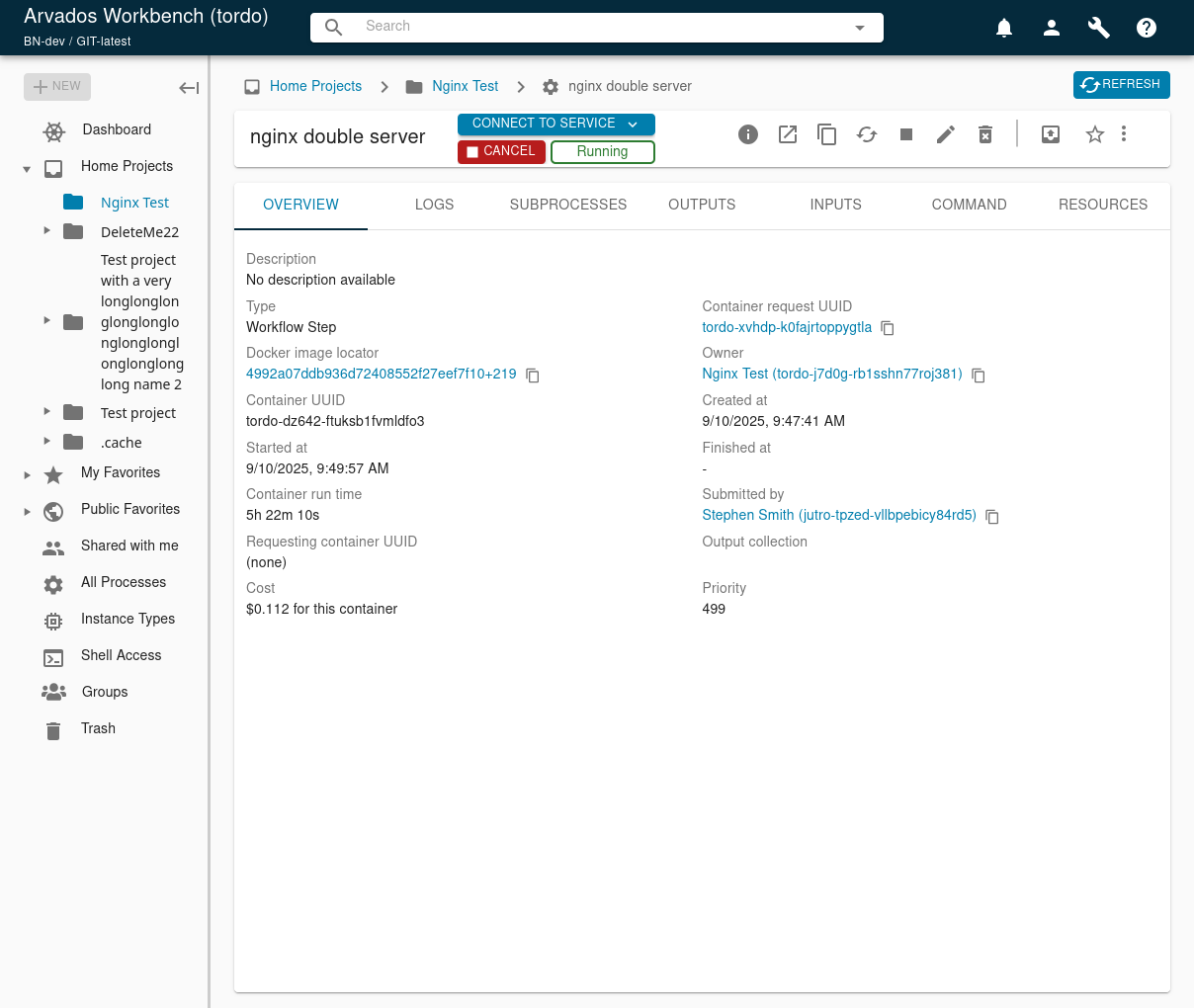
- If it has more than one published port, provide a button "Connect to service…" This opens a pulldown that lists the different services the container provides by label. The user can select one, and then Workbench opens the corresponding service URL in a new tab. The button should have the pulldown triangle on it so it's clear it's a pulldown.
- In discussion we decided on a pulldown over a modal or other options. While we fully expect there to be more than one service per container, we never expect the number to get huge. More than 10 would be very surprising. So a pulldown is easy to navigate and easy enough to implement.
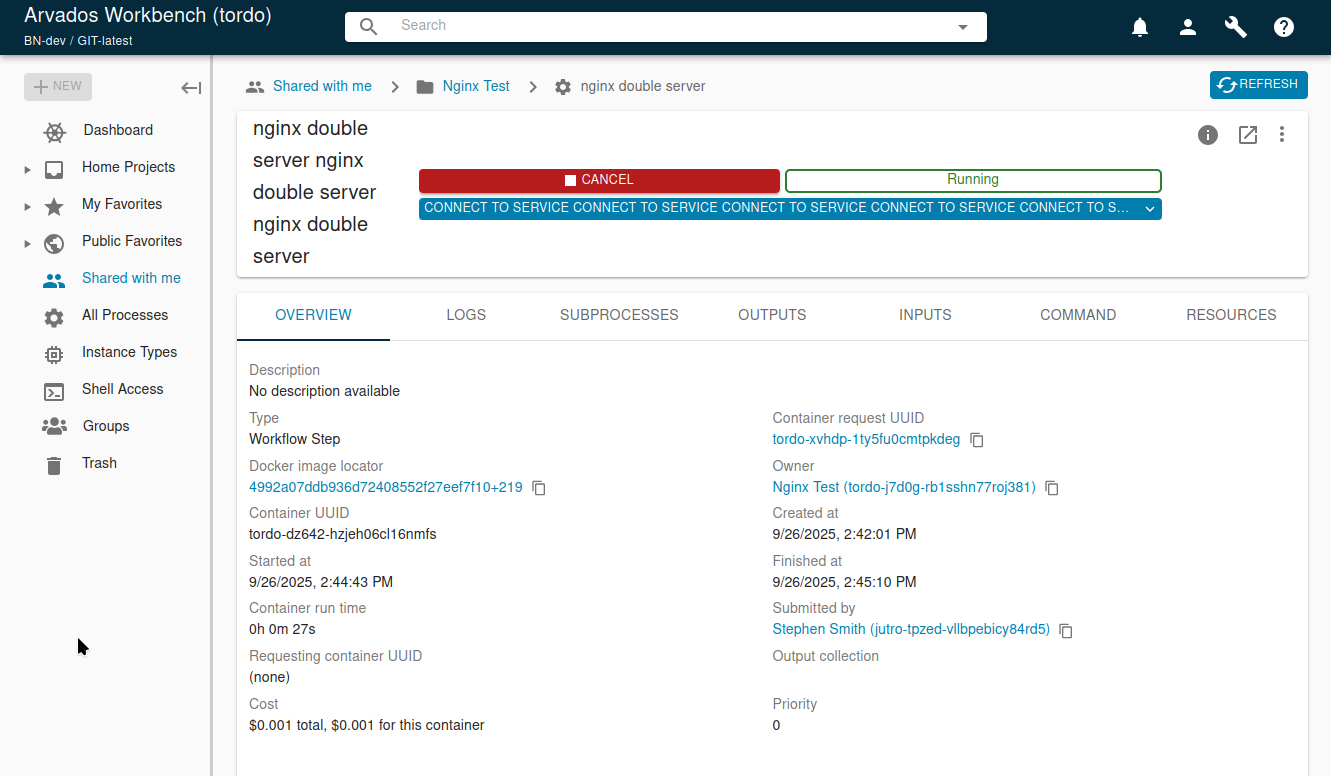
- Where should the button go? With discussion, it should become the first item among the status buttons, before the "Cancel" button and "Running" badge. In wide windows there's enough space. In two-row situations, it becomes the top button with the other two below it. We should make sure the button has enough space to accommodate reasonable two-word service names like "Jupyter Notebook" or "Foobar Imaging." We can start thinking about truncation beyond that point. The button simply does not appear for non-service containers or non-running service containers. This button should be Action Button Blue, same as the Run button for unstarted processes.
Implementation note: There is a branch that already exists, 22706-show-published-ports @ ae9e27749c15411381f9ad77e2e7b589a90633be. You may use it as much or as little as you like for this. Some background you should have about it before you start:
- It's a few weeks old so you should rebase on main first.
- It was written before the API changes discussed above, so it probably generates URLs the "old" way and would need to be updated to the "new" way above.
- We definitely want the UI described above and I think it implements something very different.
Files
 Updated by Brett Smith 9 months ago
- Related to Idea #17207: services running in containers added
Updated by Brett Smith 9 months ago
- Target version deleted (
Development 2025-07-23)
Updated by Brett Smith 8 months ago
- Related to Feature #22076: keep-web can create a zipfile on the fly of a collection added
Updated by Brett Smith 8 months ago
- Related to deleted (Feature #22076: keep-web can create a zipfile on the fly of a collection)
Updated by Brett Smith 8 months ago
- Related to Feature #22706: show published ports on workbench process page added
Updated by Brett Smith 8 months ago
- Target version set to Development 2025-08-21
- Assigned To set to Stephen Smith
Updated by Brett Smith 7 months ago
- Target version changed from Development 2025-08-21 to Development 2025-09-03
Updated by Brett Smith 7 months ago
- Target version changed from Development 2025-09-03 to Development 2025-09-17
 Updated by Tom Clegg 7 months ago
(This would have been more helpful to say earlier, but...)
Space is already tight in the top title/button bar where the "cancel" button and "running" badge are. I can see this getting awkward when the (entirely user-defined) service label gets longer.
Could this go in its own tab? It wouldn't even need to be a dropdown, we could just show the entire list. (Admittedly there are already lots of tabs.)
Could it go in the Overview tab? Even here it might not need to be a dropdown.
 Updated by Stephen Smith 6 months ago
- File running-singleservice.png running-singleservice.png added
- File running-multiservice.png running-multiservice.png added
- File service-menu.png service-menu.png added
- File service-menu-tooltip.png service-menu-tooltip.png added
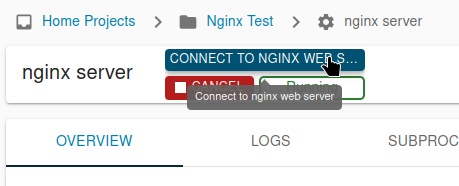
I've tried to address the space concerns by limiting the button to a fixed width and using an ellipse and tooltip to let users see the truncated name. I also ended up making it always a 2-row layout (instead of 1 row that automatically wraps) for several reasons:
- The automatic wrapping of the process name doesn't coordinate well with automatic wrapping of the button row
- In a single row layout and a short process and service name like "nginx server" and "service", the top row is basically full already so it would immediately wrap anyway once resized, so it would be a lot of work for something that won't be seen except for the most ideal cases
Here are some screenshots of the single/multi service button, the multi service menu, and the single service tooltip. The button shows up any time the process is running and there is 1 or more service definitions on the container.
Updated by Brett Smith 6 months ago
The UI is good, thanks. I happened to notice one bug that would be good to fix if possible:
- I have All Processes open in a tab.
- I submit a service container request via CLI.
- In my open tab, I see the new process and open it.
- When I open the process page, the "Connect to service" button is available (good).
- But if I just sit on that process page, after about 5-10 seconds the button disappears (bad). If I refresh the page it reappears and stays there. I'm guessing there's some state transition early in the process lifecycle that clears the button that shouldn't.
I noticed this with both single-port and multi-port containers.
Updated by Brett Smith 6 months ago
- Target version changed from Development 2025-09-17 to Development 2025-10-01
Updated by Stephen Smith 6 months ago
- Related to Feature #23163: Add confirmation dialog to process title bar cancel button added
Updated by Stephen Smith 6 months ago
- Related to Feature #23161: Cancelling a process should require confirmation added
Updated by Stephen Smith 6 months ago
Changes at arvados|cfcd70a4b097bf258553c3c45ffe0328baf3bf65 branch 23026-container-services-ui
Tests developer-run-tests-services-workbench2: #1614
- All agreed upon points are implemented / addressed.
- Added service button which shows whenever status=running and published_ports.length
- Styled buttons to always be in a 2-row format, with the stop/status stretching to match the service button width
- Added tooltip to single service button for long names
- Added error toasts for when token is missing (for private services) or empty/malformed URL
- Added published_ports field to containerRequestFieldsNoMounts, fixes the bug Brett noticed due to some requests excluding published_ports causing it to disappear
- Added unit tests for the URL token injection - I could not find a case where the URL constructor does not return a search+hash that does not match the end of the href, but that case is checked just to be safe
- Added component test for single/multi service with public/private url that verifies correct URL opened
- Added integration test to test basic service button and URL opened (I only did a basic test for the integration since the component / unit tests already cover all the edge cases)
- Anything not implemented (discovered or discussed during work) has a follow-up story.
- Follow up ticket #23161 to add confirmation dialog to cancel button to prevent misclicks
- Code is tested and passing, both automated and manual, what manual testing was done is described
- Passes all tests, added fairly comprehensive new tests
- Documentation has been updated.
- n/a
- Behaves appropriately at the intended scale (describe intended scale).
- Intended scale to be ~10ish services
- Considered backwards and forwards compatibility issues between client and server.
- There is only 1 concern, if WB is updated before the server knows about published_ports, then processes won't load. This is probably unlikely to happen since I assume the only time anyone updates WB is when they're updating arvados.
- Follows our coding standards and GUI style guidelines.
- yes
Updated by Stephen Smith 6 months ago
- File nginx.json nginx.json added
- File default.conf default.conf added
- File extra.conf extra.conf added
- File nginx-double.json nginx-double.json added
- File nginx-private.json nginx-private.json added
Steps to create the service containers with published ports are roughly following: https://dev.arvados.org/attachments/3910
(As an alternate option, I shared my nginx test project so you should be able to just edit the owner_uuid in the json to a project of your own and reuse my collections/docker image)
- Upload
default.confandextra.confto an nginx config collection - Upload a root index.html and an extra/index.html to a webroot collection
- Upload nginx docker image with
docker pull nginx:1.29.0 && arv-keepdocker nginx 1.29.0 - Replace
owner_uuidwith the project to hold the processes, container_image with the pdh of the uploaded docker image, the html mount collection uuid with the webroot collection uuid, and for the double service, the conf.d mount with the collection uuid containing nginx configs
arv container_request create -o nginx.json and the container will start
Copying and rerunning the processes loses the published ports currently.
 Updated by Lisa Knox 6 months ago
- On my screen, the ServiceMenu button cuts off with ellipses for no real reason (as in, it's not saving a significant amount of space and looks off). Removing the flexGrow, flexbasis, and minWidth properties on the
buttonContainerfrees this up and looks better in my opinion. The button will still overflow to ellipses when occluded by the toolbar, so I can't see a reason not to. - To me, it looks better if the ServiceMenu button is below the Run/Cancel button and status badge rather than above (something about the order of the colors I think), but I don't feel too strongly about it either way.
- I'm also not a fan of the ServiceMenu with multiple ports looking like an HTML
<select>but behaving like a button with a popover. Perhaps setting the width of the popover to the same as the width of the button and word-wrapping the list items? Or changing it to an MUI Select (https://mui.com/material-ui/react-select/#placeholder) maybe? Again, I don't feel too strongly about this.
injectTokenParam()is very generic and might be useful elsewhere, so it should probably be in its own file in /common- in
process.cy.jsL465, Cypress best practices recommends using data-* for test selectors, because sometimes UI libraries (like MUI) inject their own id prop.
Updated by Stephen Smith 6 months ago
Changes at arvados|fd4d2f302031a433d9b2c99b545dc549fea1ec96
Tests developer-run-tests-services-workbench2: #1622
On my screen, the ServiceMenu button cuts off with ellipses for no real reason
So I actually spent several days trying to get this to work nicely - with the suggested changes, the service button does expand to take up extra space, but that happens at the expense of space for the title which is noticeable when the title is long. It seems flexbox is unable to operate in a mode where the title is 100% prioritized before giving extra space to the button cluster, since flexbox allocates space in a proportional mode. So when the process title and service name are both long, space is split proportionally between them causing the service button to get a lot of space and causing the title to wrap.
Ideally, the title would be given as much space as possible minus the minimum space required for the buttons (their min-width) and then the service button expanded as needed, but I don't think it's possible to do that without JS. I had attempted to make this happen by making the flex-basis of the title to be content and the flex-basis of the button to be it's min-width, but flex-basis doesn't seem to work as expected for content that wraps (I think the basis ends up being the wrapped content). And then there's the problem that you must pick a static proportion for allocating extra space or shrinking the basis if the title is too big. Removing flex-grow and flex-shrink really just defaults it 0 and 1, so the areas would be equally shrunk as necessary instead of shrinking the button cluster before the title so you end up with a wrapped title and the button cluster awkwardly taking up half the space.
(basically this can happen and because the allocation is proportional to flex-basis, there isn't a good way to prevent it)
I would be open to a solution but I don't think it's easy to make it behave nicely with longer process titles, and I think that may be a common case so it seems safer to just stick to a static button cluster width.
To me, it looks better if the ServiceMenu button is below the Run/Cancel button
Done
I'm also not a fan of the ServiceMenu with multiple ports looking like an HTML <select>
I was actually modeling it after the Menu component (https://mui.com/material-ui/react-menu/#customization). I would push back against using Select since it's unexpected for a select input to perform an action when something is selected, and I think the popover menu being a different width is fine since it's anchored on one corner and that's the normal behavior in the MUI example
injectTokenParam() is very generic and might be useful elsewhere
Moved to common/url
in process.cy.js L465
Fixed, I kept the ID since it's used for aria-labeledby but the test uses data-cy
Updated by Stephen Smith 6 months ago
Updated by Brett Smith 6 months ago
- Target version changed from Development 2025-10-01 to Development 2025-10-15
Updated by Stephen Smith 6 months ago
- Status changed from In Progress to Resolved