Bug #23061
open
Improve Workbench display of compound property values
Description
Proposed solution
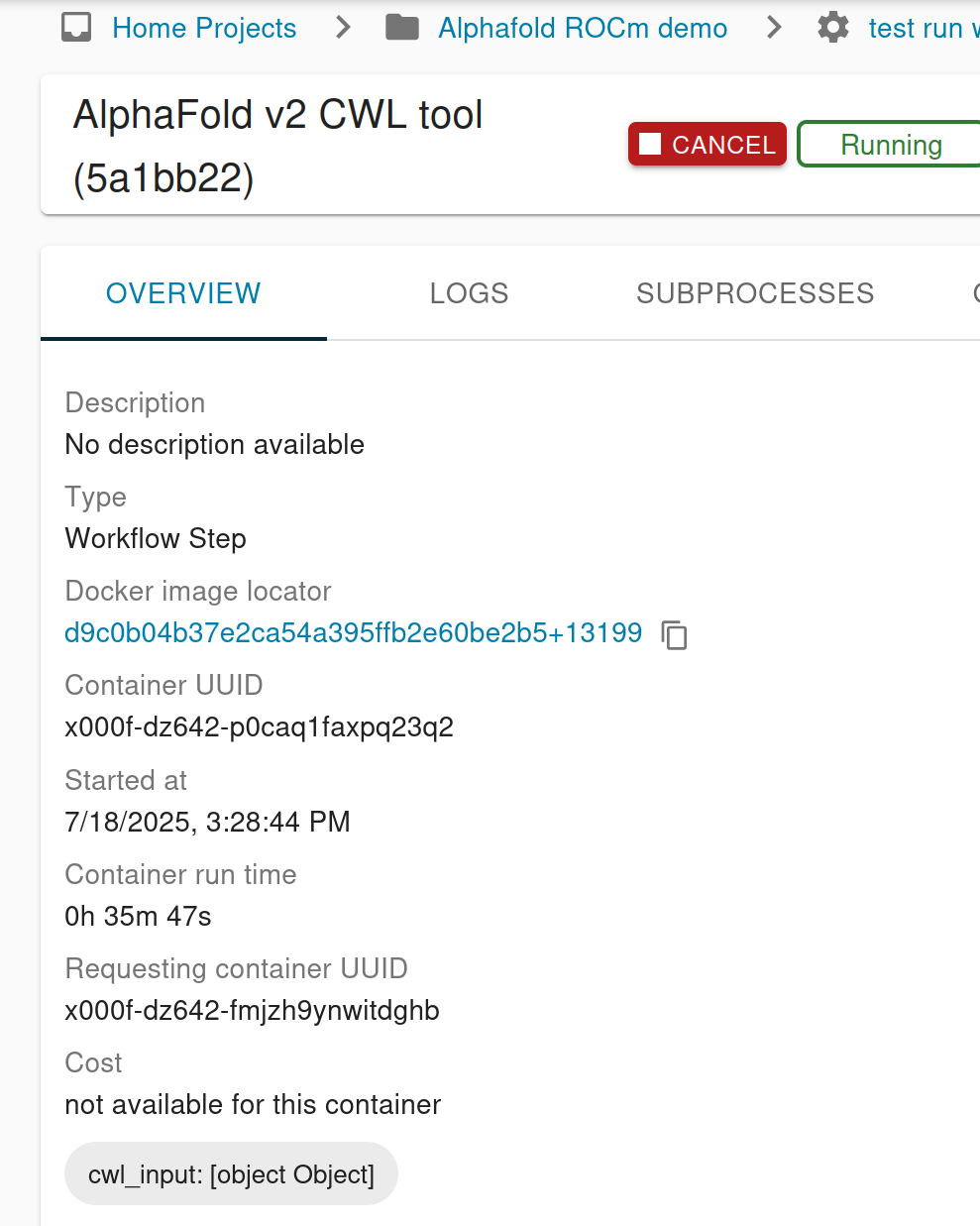
This is happening because the chit only expects to render a string there, so when it gets handed a complex object it stringifies in the usual JavaScript way.
While we don't often use complex properties and there's maybe a discussion to be had about this specific application, kind of the whole point of properties is that they're arbitrary, so it's worth improving how Workbench handles this.
In general we talked about offering some way to click the chit to see the full value. One wrinkle with that is clicking the chit currently copies to clipboard, so we don't want to make it ambiguous what's going to happen when you click. So, the proposed solution is to make the chit have no action associated with clicking the chit itself, and the display of the chit is:
- Property name: as now
- Property value: for simple values, the string as now. For complex value, an icon (an eye?) that you can click to pop up the full value.
- A "copy to clipboard" icon: like we have elsewhere throughout the UI. This should copy only JSON representation of the value to your clipboard, and nothing else.
Files
 Updated by Zoë Ma 8 months ago
- Category set to Workbench2
- Subject changed from Workflow step overview page shows "cwl_input: [object Object]" and to Workflow step overview page shows "cwl_input: [object Object]" and "cwl_output: [object Object]"
- File Screenshot from 2025-07-18 16-04-52.png Screenshot from 2025-07-18 16-04-52.png added
Since I can't figure out how to run a non-minified WB and produce more usable console messages, let me describe how to reproduce this issue.
Basically,
- Create any workflow run that takes input (either via commandline or run existing process in WB)
- Run the workflow
- Go to the "Overview" tab on the workflow step page.
WB deb package version is 3.2.0~dev20250703175452-1 and python3-arvados-cwl-runner is 3.2.0~dev20250630233555-1
 Updated by Brett Smith 8 months ago
- Subject changed from Workflow step overview page shows "cwl_input: [object Object]" and "cwl_output: [object Object]" to Improve Workbench display of compound property values
Updated by Brett Smith 8 months ago
Zoë Ma wrote in #note-4:
For this particular case, are the "chits"
cwl_inputandcwl_outputsupposed to just refer to the JSON value already shown in the "Inputs" and "Outputs" tabs?
Yes. I thought this change might have been related to some of the workflow API work in #21074 but it's not, it's new because of the way we started rendering process properties in (I think?) #22793. We need to address this, it feels like a regression. Thanks for pointing it out.
Because I have already written this feature up it I will leave this ticket as-is but if we decide not to do it for 3.2.0 I'll make a smaller spin-off ticket to avoid the redundancy.
Updated by Brett Smith 8 months ago
- Related to Bug #23063: Process overview should filter out cwl_input and cwl_output properties added