Idea #21292
open
New workflow picker panel
Description
Introduce a new workflow picker panel
- Add a "Workflows" item on the side bar.
- "Run a workflow" button brings up the same picker with the project set to the current project
See #20059 for customer notes, #22662 for ideas of a UI we can base this on
Some mockups
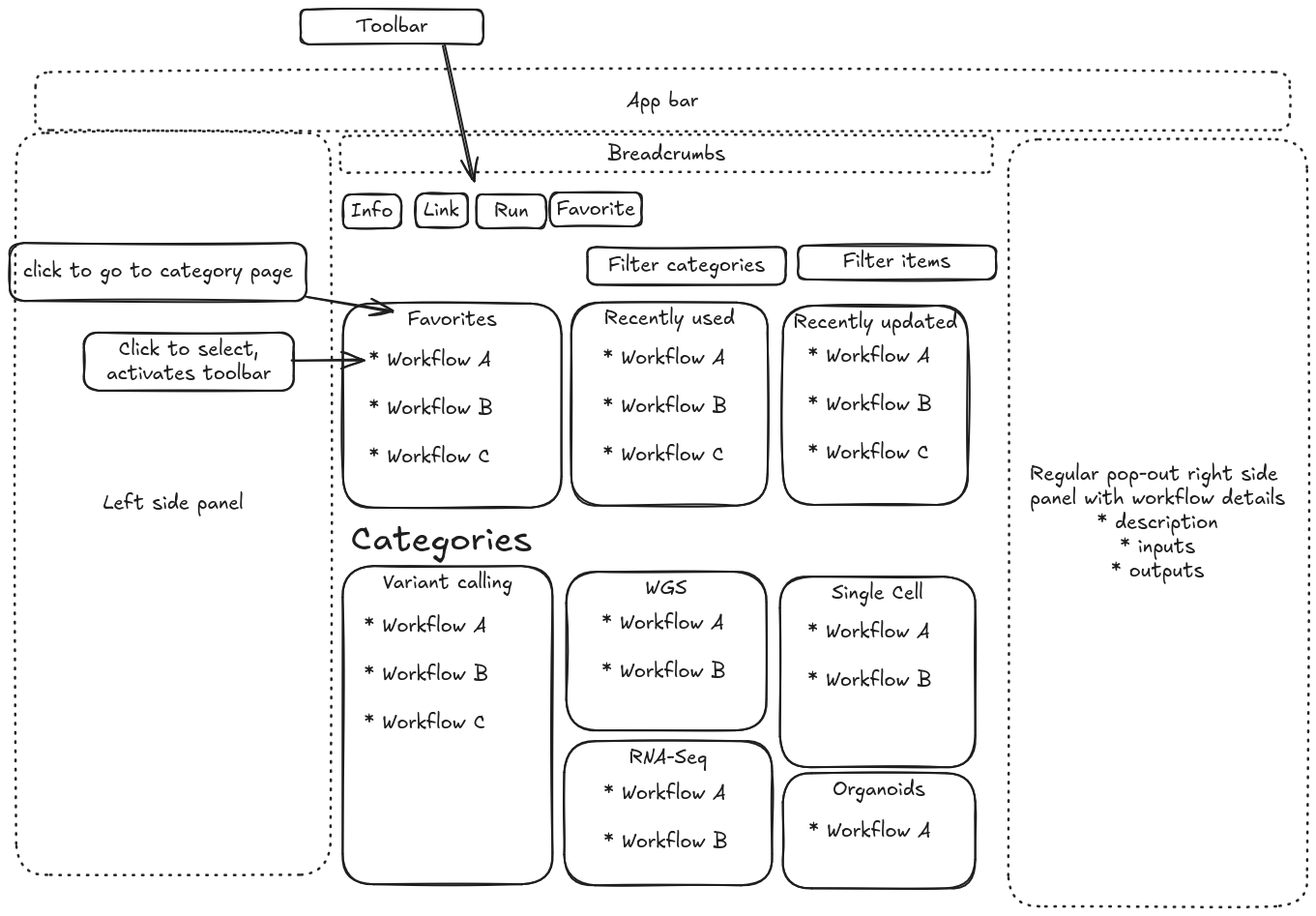
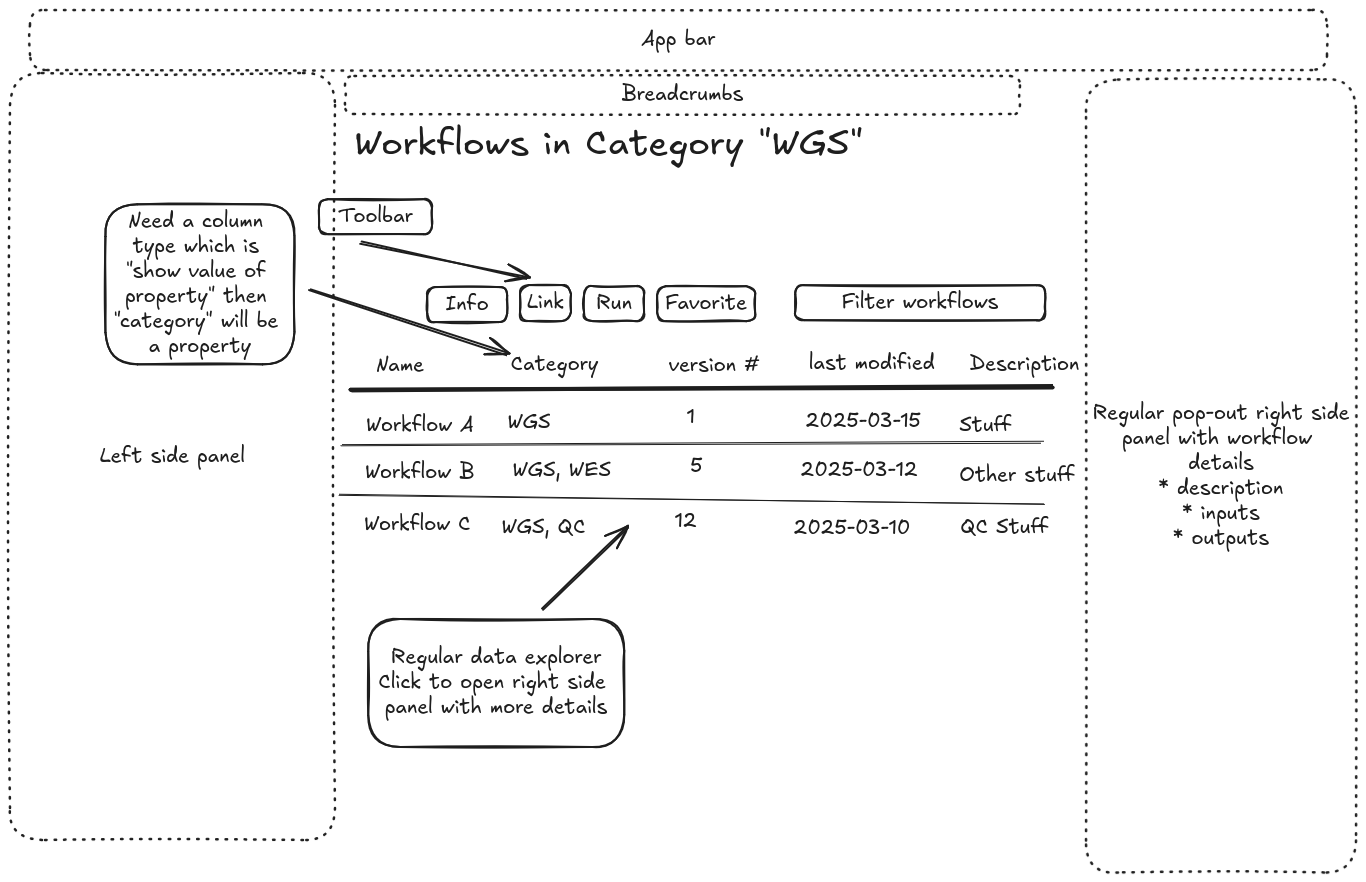
Old design concept is at #20981#note-11
Files
 Updated by Peter Amstutz over 2 years ago
- Related to Feature #20880: Can link to wb2 URL to prompt user to launch workflow, specify project uuid in query added
Updated by Peter Amstutz over 2 years ago
- Target version changed from Development 2024-01-31 sprint to Development 2024-02-14 sprint
Updated by Peter Amstutz about 2 years ago
- Target version changed from Development 2024-02-14 sprint to Development 2024-02-28 sprint
Updated by Peter Amstutz about 2 years ago
- Target version changed from Development 2024-02-28 sprint to Development 2024-03-13 sprint
Updated by Peter Amstutz about 2 years ago
- Target version changed from Development 2024-03-13 sprint to Development 2024-03-27 sprint
Updated by Peter Amstutz about 2 years ago
- Target version changed from Development 2024-03-27 sprint to Development 2024-04-24 sprint
Updated by Peter Amstutz almost 2 years ago
- Target version changed from Development 2024-04-24 sprint to Development 2024-05-08 sprint
Updated by Peter Amstutz almost 2 years ago
- Target version changed from Development 2024-05-08 sprint to Development 2024-06-05 sprint
Updated by Peter Amstutz almost 2 years ago
- Related to Idea #19132: Improve UX for registering, browsing, and launching workflows added
Updated by Peter Amstutz almost 2 years ago
- Target version changed from Development 2024-06-05 sprint to 439
Updated by Peter Amstutz almost 2 years ago
- Target version changed from 439 to Development 2024-07-03 sprint
Updated by Peter Amstutz almost 2 years ago
- Target version changed from Development 2024-07-03 sprint to Development 2024-07-24 sprint
Updated by Peter Amstutz almost 2 years ago
- Target version changed from Development 2024-07-24 sprint to Development 2024-08-07 sprint
Updated by Peter Amstutz over 1 year ago
- Target version changed from Development 2024-08-07 sprint to Future
Updated by Peter Amstutz about 1 year ago
- Description updated (diff)
- File workflow-categories(2).excalidraw workflow-categories(2).excalidraw added
- File workflow-category-table(2).excalidraw workflow-category-table(2).excalidraw added
- File workflow-category-table.png workflow-category-table.png added
- File workflow-categories.png workflow-categories.png added
Updated by Peter Amstutz about 1 year ago
- Related to Support #22675: import bio-cwl-tools added
Updated by Peter Amstutz about 1 year ago
- Related to Feature #21074: "workflow" records link to a collection with the actual workflow added
Updated by Peter Amstutz 10 months ago
- Has duplicate Idea #20097: Improve workflow picking/selection added
Updated by Peter Amstutz 10 months ago
- Has duplicate Bug #19478: registered workflow page is lacking in wb2 added
Updated by Peter Amstutz 10 months ago
- Has duplicate Idea #20059: Customer notes re Redesign Register Workflow Panel added
Updated by Peter Amstutz 10 months ago
- Related to Idea #20981: Visual design for projects, search, and workflow picking added
 Updated by Sarah Zaranek 10 months ago
DNA Nexus uses a tool library --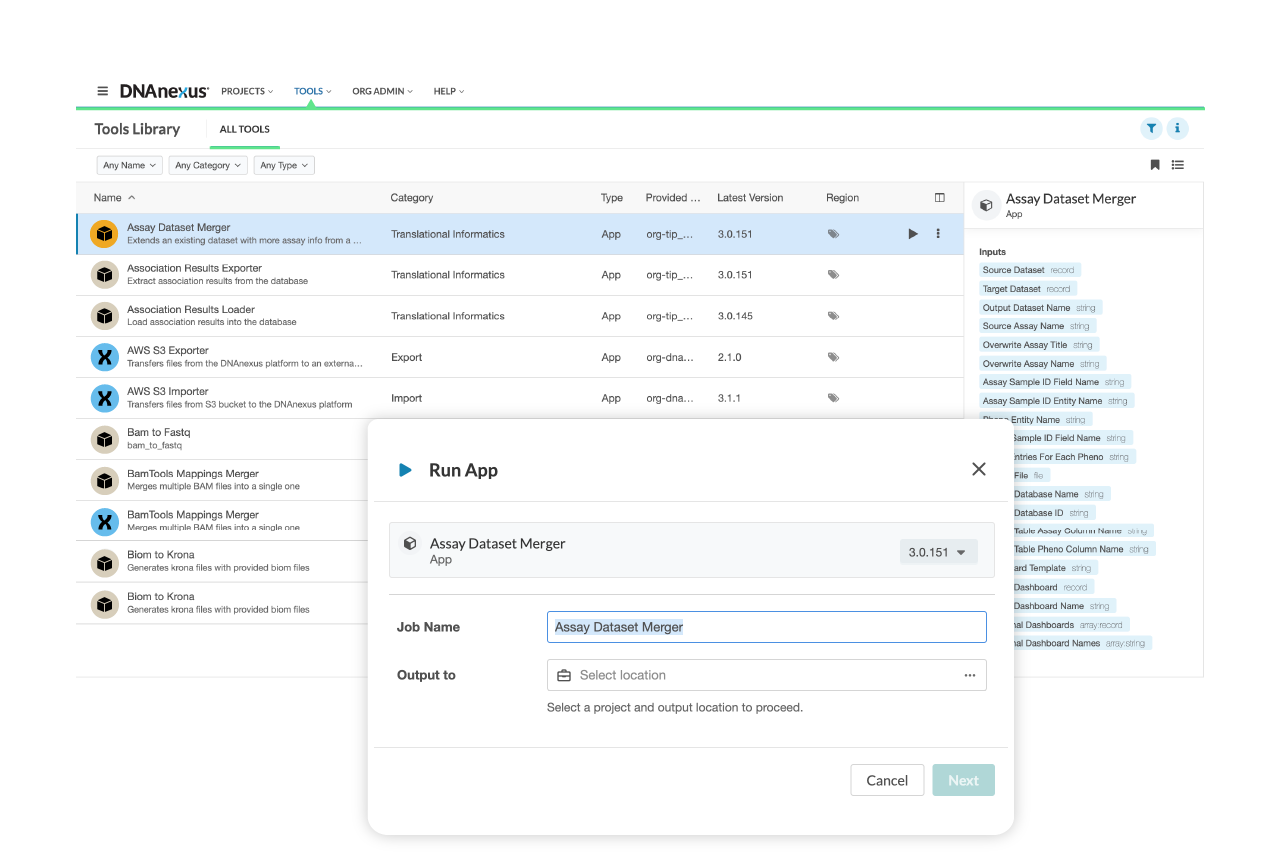
There is not a tile view in the DNAnexus Tool Library UI. It uses a list view only, where apps and workflows are displayed in a tabular format with metadata like name, version, and summary. There exists a detailed view to get additional information about the tool(showing things like inputs/outputs)
List of available metadata via UI for tile library entries:- Name / Title – Human-readable name of the app or workflow
- Summary – Short description of what the tool does
- Version – Version number (e.g. 1.2.0)
- Tags / Categories – Labels like “QC”, “RNA-seq”, “Alignment” (used for filtering and discovery)
- Last Modified – Date the tool was last updated
- Inputs / Outputs – Shown in the detail view, with expected file types and formats
- Documentation Link – Optional; visible if defined in the tool config
- Author / Publisher – Sometimes shown in the detail view or under description
- Executable Type – App, Applet, Workflow (may be displayed as an icon or filter)
- “Any Name” → Filters by matching text in tool names (or selects a specific tool if pre-populated).
- “Any Category” → Filters tools by their category tag (e.g., "QC", "Alignment", etc.).
- “Any Type” → Filters tools by type (e.g., App, Applet, Workflow).
- Name
- Last Modified
( there might be more but these were the ones I could verify)
Type is dependent on the object class on the platform (Workflow, App , Applet)
Category is defined by users in dxapp.json file
In DNAnexus, the categories field used in the Tool Library UI is not hardcoded or restricted to a predefined list.
Updated by Sarah Zaranek 10 months ago
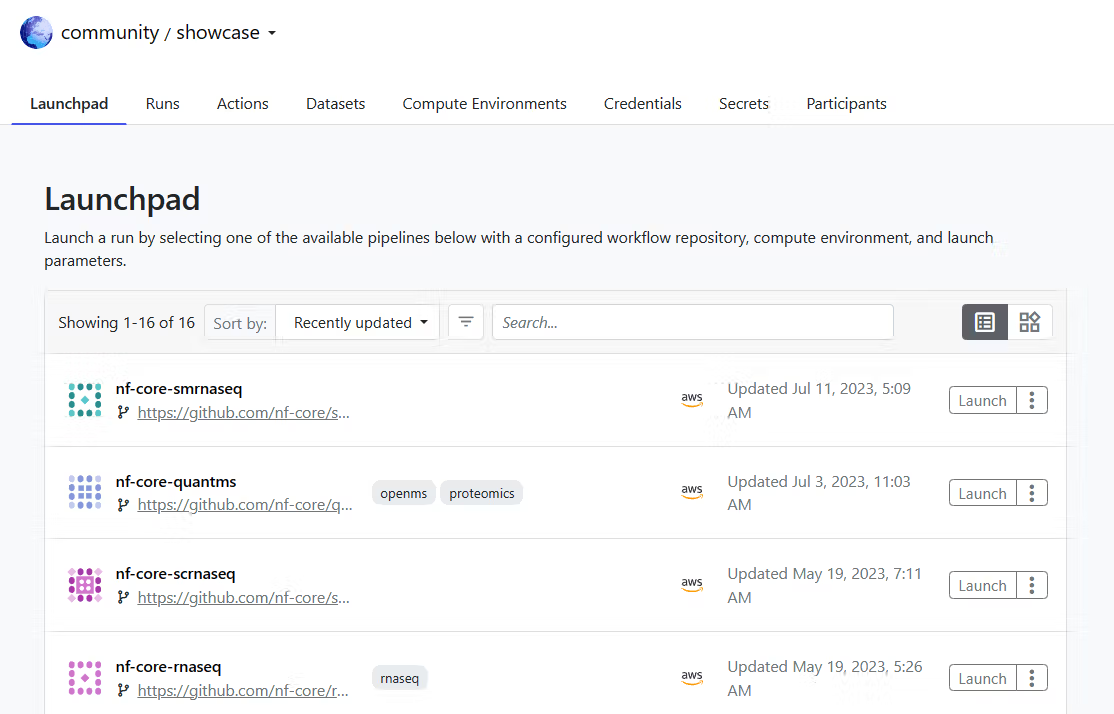
Sequera platform/Tower calls it a launch pad. I can find images that have a list view and one that has a more app store like interface. https://docs.seqera.io/platform-cloud/launch/launchpad
The Launchpad enables workspace users to launch pre-configured pipelines, add new pipelines, or perform a quick launch of unsaved pipelines. Use the Sort by: dropdown to sort pipelines, either by name or most-recently upda
Launchpad offers two distinct views for browsing and managing pipelines: the list view and the tile view. You can seamlessly switch between these views using the toggle located next to the search field in the Launchpad interface.
List View: This is the default view in the Launchpad. It presents pipelines in a tabular format, displaying details such as pipeline name, repository, compute environment, and last updated time.
Tile View: This view showcases pipelines as individual cards or tiles, providing a more visual representation, similar to an app store layout.
https://seqera.io/blog/getting-started-with-nextflow-tower/
In both List View and Tile View, you can sort pipelines by:- Name
- Most recently updated
List View
- Pipeline Name
- Repository (Git URL or short name)
- Revision (branch/tag/commit)
- Compute Environment
- Last Updated
- Description (if available)
- Pipeline Name
- Repository Source (e.g., GitHub icon + repo name)
- Compute Environment Name
- Last Updated Date
- Tags or labels
- Launch button
Some metadata is truncated for space in Tile View, but hovering may show more.
Updated by Sarah Zaranek 10 months ago
- File overview_launch.png overview_launch.png added
- File launchpad2.png launchpad2.png added
Launchpad views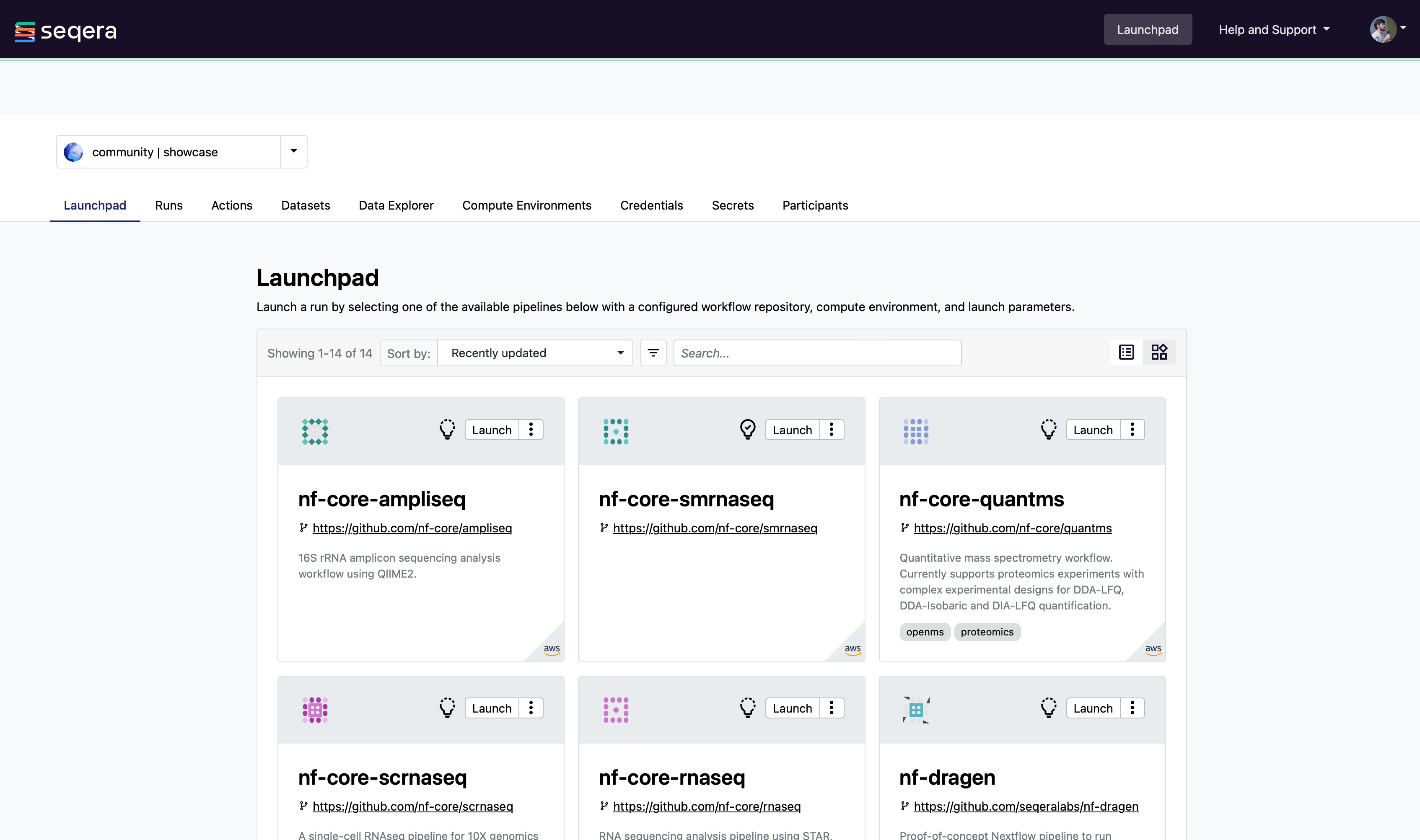
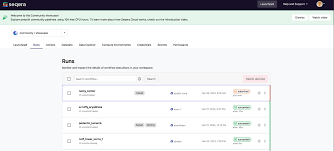
Updated by Sarah Zaranek 10 months ago
- File launchpad-4.avif launchpad-4.avif added
Adding a higher def image.
Updated by Sarah Zaranek 10 months ago
VELSERA (aka Seven Bridges) has a public version of their Apps. I am not sure they have a name of it besides the Apps or App Section.
Here is the public link: https://igor.sbgenomics.com/public/apps?utm_source=chatgpt.com
The Apps tab includes a "Category" metadata field that is partially standardized. Although evolving, this is a good starting point for the entries in that list:
Alignment
Assembly
ChIP-seq
CNV (Copy Number Variation)
Data Preparation
DNA Methylation
Epigenomics
Expression Analysis
Gene Fusion Detection
Genotyping
Germline Variant Calling
Immunogenomics
Metagenomics
Multi-omics
Normalization
Pathway Analysis
Peak Calling
Quality Control
RNA-seq
Single-cell
Somatic Variant Calling
Structural Variants
Transcriptomics
Variant Annotation
Variant Calling
Visualization
Whole Genome Sequencing (WGS)
Whole Exome Sequencing (WES)
Note: you cannot add arbitrary category values directly through the UI.
Updated by Sarah Zaranek 10 months ago
I asked chatgpt to summarize the pros and cons of each section - which ended up being more about the platform and not how the tools/apps/wf are showcased but I thought it was interesting...
🔬 Seven Bridges – Apps Section
👍 Pros:
Extensive Tool Library: Hosts over 550 tools and workflows, maintained by bioinformaticians to ensure up-to-date versions.
    sevenbridges.com
Reproducibility: Automatically logs every tool, version, parameter, and data used in analyses, facilitating reproducibility.
sevenbridges.comCollaboration Features: Supports distributed research groups with secure, role-based access controls and commenting systems.
sevenbridges.com👎 Cons:
Management Challenges: Some users have noted issues with project direction and management within teams.
    glassdoor.com+3indeed.com+3indeed.com+3
Growth Pains: Rapid expansion has led to challenges in maintaining consistent communication and strategy alignment.
glassdoor.com+1indeed.com+1🧬 DNAnexus – Tool Library
👍 Pros:
Scalability: Efficiently handles large-scale genomic data analyses with scalable computational resources.
arxiv.org+2peerspot.com+2pmc.ncbi.nlm.nih.gov+2
Security and Compliance: Offers robust data security measures, suitable for handling sensitive genomic information.
    peerspot.com+1g2.com+1
User-Friendly Interface: Recent UI updates have improved navigation and usability, including enhanced filtering options.
blog.dnanexus.com👎 Cons:
Cost: Some users find the platform expensive, especially for smaller projects or institutions.
    reddit.com
Workflow Complexity: Rebuilding and integrating apps into workflows can be cumbersome and non-intuitive for some users.⚙️ Seqera – Launchpad
👍 Pros:
Intuitive UI/UX: Praised for its user-friendly and customizable interface, facilitating ease of use for both novices and experts.Cloud Integration: Simplifies submission of runs on cloud platforms like AWS, with features like cost tracking enhancing usability.
g2.com+1g2.com+1Community Engagement: Active feedback forums allow users to suggest features and improvements, fostering a responsive development environment.
seqera.io+1feedback.seqera.io+1👎 Cons:
Run Management: Some users find the deletion and cleanup of runs to be less straightforward, indicating room for improvement in run management features.Feature Limitations: Certain advanced features, like chaining of pipelines and fine-grained authorization, are still in development or planned for future releases.
feedback.seqera.io
Updated by Sarah Zaranek 10 months ago
Summary of Features using ChatGPT based on above UIs and feedback from customers. Some of these are integrated with the functionality of the platform itself often because there is no other way to access the workflow.
| Feature Category | Description | Priority | Audience |
| ----------------------------------- | ------------------------------------------------------------------------ | ------------- | -------------------------------- |
| 🔍 Search & Filter | Search by name, tags, category, tool type | Must-Have | All users |
| 🏷 Metadata Display | Title, summary, description, version, inputs/outputs, docs | Must-Have | All users |
| 📁 Organization Tools | Tags, labels, grouping, favorites | Must-Have | Teams, enterprise users |
| 🚀 Launch Interface | GUI form to launch with validation, defaults, reusable configs | Must-Have | Bioinformaticians, collaborators |
| 🔁 Versioning & Reproducibility | Immutable versions, changelogs, provenance tracking | Must-Have | Regulated & scientific workflows |
| 🧩 Reusability & Modularity | Shared modules, reusable components, templates | Must-Have | Teams, engineers |
| 🔒 Access Control | Shareable with roles (view, run, edit), public/private | Must-Have | Enterprises, collaborations |
| ☁️ Execution Binding | Link workflows to specific compute environments (cloud, hybrid, on-prem) | Must-Have | Cloud/infrastructure teams |
| ⚙️ Editing Options | Visual editor + text (Nextflow, CWL, WDL), Git integration | Must-Have | Developers, DevOps |
| 📈 Analytics & History | Run history, performance metrics, cost reports | Must-Have | Admins, platform operators |
| Feature Category | Description | Priority | Audience |
| ------------------------------- | -------------------------------------------------------- | ------------- | ------------------------------- |
| ⭐ Tool Popularity & Ratings | Show most-used, starred, or rated workflows | Nice-to-Have | All users |
| 👤 Author/Owner Metadata | Show who built or maintains each workflow | Nice-to-Have | All users |
| 🧪 “Try Now” Mode | One-click test launch with built-in demo inputs | Nice-to-Have | New users, collaborators |
| 🖼 Custom Icons/Branding | Emojis or logos for apps/workflows for better visual nav | Nice-to-Have | UI-focused teams |
| 📊 Usage Tracking/Feedback | Run frequency, comments, user feedback | Nice-to-Have | Enterprise operations |
| 🔄 Workflow Comparison | Compare inputs, tools, and structure side-by-side | Nice-to-Have | Tool evaluators |
| 🧠 Recommendation System | Suggest tools based on recent runs or metadata | Future-Useful | Large teams, clinical platforms |
| 💻 CLI/API Integration | Run, register, and search tools via API or command line | Nice-to-Have | DevOps, pipelines at scale |
 Updated by Brett Smith 9 months ago
- Target version deleted (
Development 2025-07-23)
Updated by Brett Smith 9 months ago
- Related to Idea #22959: Create a User Dashboard in Workbench added